
People compare mSpy alternatives for a few practical reasons: the iPhone version may not support the feature they expected, the setup may require more access than they have, or the renewal price may no longer make sense. The right replacement depends on whether you need screen-time controls, family location, safety alerts or a broader activity dashboard.
If you are replacing mSpy because you suspect unwanted monitoring on your own phone, run a phone privacy review before installing another product.
Try the Sphnix dashboard first
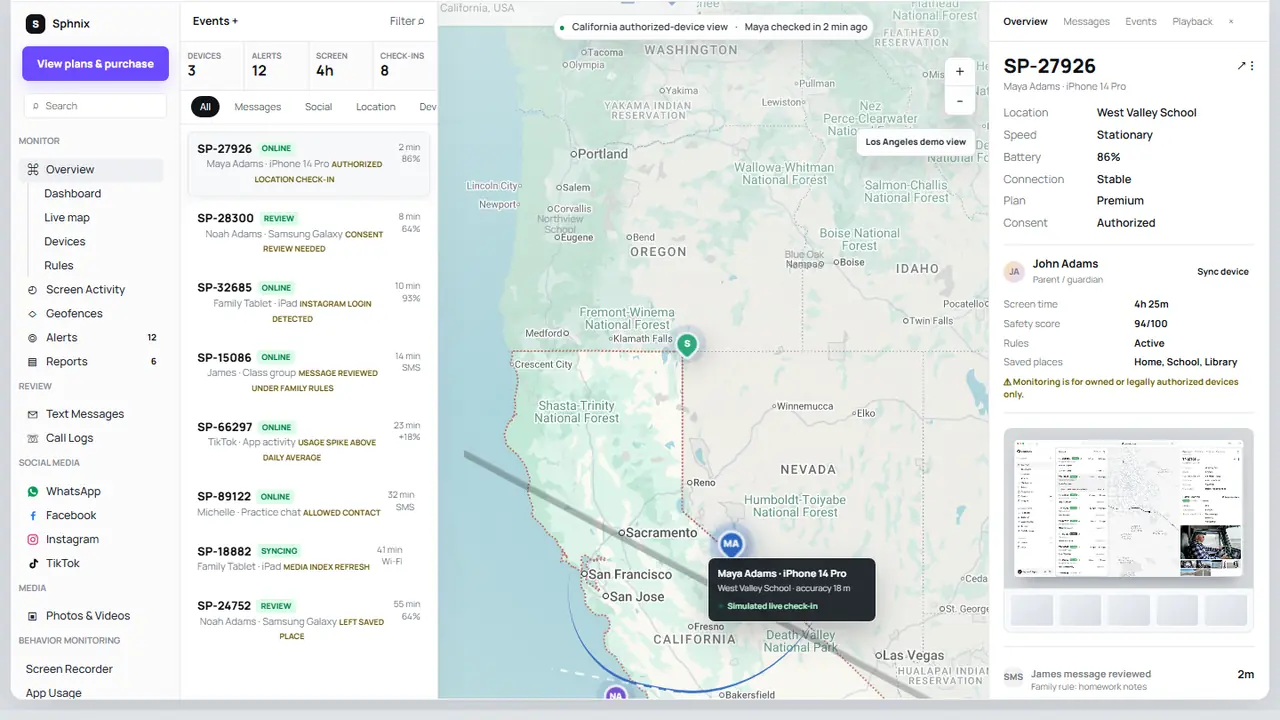
Sphnix is the easiest option here to inspect before buying. The live demo shows device status, calls, text messages, social activity, location, photos, alerts and reports with sample data.
mSpy alternatives at a glance
| Alternative | Best fit | Platforms | Buying path |
|---|---|---|---|
| 1. Sphnix | Previewing a full monitoring dashboard | Confirm device and plan requirements | Live demo |
| 2. Eyezy | Comparing a commercial activity dashboard | iPhone and Android; features differ | Check Eyezy |
| 3. Parentaler | Parent-focused monitoring and family rules | Check current iOS and Android support | Check Parentaler |
| 4. Spynger | Comparing broad activity-monitoring claims | Setup varies by platform | Check Spynger |
| 5. Apple Screen Time | Free iPhone app limits and content controls | Apple devices | Apple setup |
| 6. Qustodio | Screen time, filtering and family reports | Multi-platform; features differ | Review current plan |
| 7. Bark | Safety alerts rather than constant review | Multi-platform; iOS has limits | Review iOS coverage |
| 8. Google Family Link | Free controls for Android families | Strongest on Android | Google account setup |
Spy Wizards may receive compensation from marked partner links. The comparison order reflects buyer fit and setup clarity, not commission size.
Why people look for an mSpy replacement
The search is usually less about finding another product with the same logo and more about fixing a mismatch. A parent may only need downtime and app limits. Another family wants location alerts. Someone managing company-owned phones may need device policies rather than message monitoring. Paying for the broadest dashboard can be wasteful when a free built-in tool already handles the job.
Platform differences matter as well. Android permits forms of device access that Apple restricts. A vendor can advertise one feature list, yet require a different setup or provide less data on iPhone. Our mSpy review explains the product-specific questions to ask. If you are shopping only for iOS, compare the best iPhone monitoring apps instead.
Eight alternatives to mSpy
1. Sphnix: best for a demo-first decision
Our pick
Sphnix makes sense when you want to see how monitoring records are organized before paying. The demo has separate areas for messages, call logs, social apps, live location, photos, screen activity, device status and weekly reports. It also shows long histories rather than a few placeholder rows.
Check before buying: confirm the supported phone, connection method and plan-specific data sources. A demo proves the dashboard experience; it does not mean every data type is available from every device.
2. Eyezy: best paid dashboard comparison
Partner
Eyezy is a useful second quote for buyers considering a commercial monitoring dashboard. Its public material covers activity review and family supervision, but you still need to separate iOS features from Android features. Check the setup guide for the phone you manage instead of relying on a single marketing table.
Check before buying: installation access, supported operating-system version, sync frequency, renewal price and refund conditions.
3. Parentaler: best for a parent-focused shortlist
Partner
Parentaler is positioned around family use, which makes the buying decision easier to frame. Decide whether the priority is app use, location, web safety or household rules. Then verify that the current app supports those specific functions on the child’s phone.
Check before buying: child profiles, device count, iPhone limitations, subscription length and the cancellation process.
4. Spynger: best for comparing monitoring scope
Partner
Spynger markets a wide monitoring scope. That makes it worth comparing, but also makes precise verification important. Broad product claims can conceal platform restrictions. Do not assume a named feature works identically on iPhone and Android, and do not use relationship-focused marketing as permission to monitor another adult secretly.
Check before buying: the exact data source for each iOS feature, visible account or device notices, support response and billing terms.
5. Apple Screen Time: best free iPhone alternative
Free
For many iPhone families, Screen Time is enough. Apple says parents can review usage, set app limits, schedule downtime and manage content restrictions through Family Sharing. It does not provide a private-message archive, but it avoids another subscription and works inside Apple’s account model.
Check before setup: Family Sharing membership, the child’s Apple Account, the Screen Time passcode and current device software. Our guide to screen-time control apps covers other choices.
6. Qustodio: best for schedules and web filtering
Family safety
Qustodio is a mainstream parental-control product built around screen-time schedules, web controls and family reporting. It is a better fit than mSpy when the goal is managing routines rather than collecting the deepest possible activity history.
Check before buying: browser coverage, iOS app controls, location support, device count and whether the free tier is enough for a trial.
7. Bark: best for safety alerts
Family safety
Bark takes a different approach. It focuses on alerting parents to selected concerns instead of presenting every activity item for routine reading. Some families prefer that balance because it leaves more day-to-day privacy while still creating a path for safety conversations.
Check before buying: which services can be connected on iOS, whether a computer is needed for any workflow, and how alert coverage differs by plan.
8. Google Family Link: best free Android option
Free
Family Link is the practical free choice for a child using Android. It supports app approvals, daily limits, bedtime settings and location features within Google’s family system. It is not a like-for-like mSpy replacement, and it does not turn an Android phone into a complete message archive.
Check before setup: the child’s age and Google Account, Android version, family group and the controls available in your country.
How we evaluated mSpy alternatives
We looked at the decision a buyer must make, not the number of icons on a sales page. The important questions are whether the app supports the phone in front of you, whether the setup method is clearly disclosed, whether the dashboard solves the intended problem, and whether billing terms are easy to find. We did not label every product “tested” because we did not perform a new hands-on laboratory test of every service for this update.
We also separated monitoring from parental control. Screen Time and Family Link are strong controls but weak substitutes for a detailed activity dashboard. Sphnix, Eyezy, Parentaler and Spynger are commercial dashboard comparisons, but their available data depends on platform and setup. Qustodio and Bark sit closer to mainstream family safety.
What to check before switching
- Name the missing feature. Do not replace an entire product when you only need better screen-time controls or location sharing.
- Confirm platform support. Ask for the current iOS or Android setup page and verify the operating-system version.
- Check required access. Legitimate installation may require the phone in hand, a family account, permissions or business enrollment.
- Export what you are allowed to keep. Canceling one service may remove dashboard history.
- Read renewal terms. Compare the full billing period, not only the introductory offer.
- Remove the old app or profile. Two monitoring products can cause duplicate alerts, battery drain and confusing reports.
Should you stay with mSpy?
Switching is not automatically the best move. If mSpy already supports your device, the required features work, and the renewal cost fits your budget, changing tools creates fresh setup work. Buyers who are still comparing can use the official partner path below, but should verify current device requirements first.
Check current mSpy compatibility
Pick the option that matches the job
Use Sphnix when you want to inspect a broad dashboard. Use Apple Screen Time or Family Link when free household controls solve the problem. Compare the paid alternatives only after confirming platform support.
Frequently asked questions
What is the best alternative to mSpy?
Sphnix is our top choice for buyers who want to preview a complete monitoring dashboard. Apple Screen Time is the best free iPhone option for app limits, while Google Family Link is a strong free Android option. The right choice depends on the phone and required feature.
Are there free apps like mSpy?
Apple Screen Time and Google Family Link are free, but they focus on family controls rather than deep activity monitoring. Qustodio and other parental-control products may offer limited free plans; check current terms.
Which mSpy alternative is best for iPhone?
Start with Apple Screen Time for limits and content controls. Preview Sphnix for a dashboard-based workflow, then compare Eyezy or Parentaler after confirming their current iOS setup and supported features.
Can an mSpy alternative work without physical access?
Initial setup commonly requires the device owner’s participation, physical access, an existing family account or authorized business enrollment. No trustworthy service can provide unrestricted phone access from a number alone.
How do I cancel mSpy before switching?
Use the account and billing instructions in your subscription confirmation, save any records you are allowed to retain, confirm that recurring billing is stopped, and remove any app or management profile from the device.
Final verdict
The best mSpy alternatives do different jobs. Sphnix is the strongest demo-first commercial option in this comparison. Eyezy, Parentaler and Spynger give buyers additional paid choices through verified tracking links. Screen Time, Qustodio, Bark and Family Link are better suited to family controls and safety. Choose after checking the exact device setup, not after counting features on a generic sales page.
Sources: Apple Screen Time for a child, Apple Family Sharing, and FTC stalkerware guidance.
Leave a Reply