
PHONE ACTIVITY GUIDE / UPDATED SEPTEMBER 2026
The practical answer is to connect a phone you own or are authorized to manage to a compatible monitoring dashboard. Sphnix is designed to organize supported location updates, call records, messages, app activity, and reports in one place. It cannot unlock any random phone from a number alone, and the available data depends on the device, operating system, permissions, and setup method.
Best fit: parents managing a child’s device, owners reviewing their own phone, and organizations overseeing company-owned devices with documented permission.
THE DIRECT ANSWER
Can you really see what someone is doing on their phone?
Yes, when you have the right to manage the device and complete the required setup. A monitoring tool can collect the categories supported by that phone and display them remotely in a web dashboard. Depending on the platform and permissions, that may include location, call history, SMS, app usage, browser activity, saved media, alerts, and selected social-app records.
What you should not expect is instant access to a stranger’s phone by entering a number. Modern Android phones and iPhones protect private data with account authentication, app permissions, encryption, and operating-system restrictions. Any seller promising universal access without setup is avoiding the most important technical detail.
You want one visual dashboard for supported activity on a permitted device.
Choose a plan
WHAT THE DASHBOARD CAN SHOW
Start with the information you actually need
A useful phone-monitoring setup does not need to promise “everything.” It needs to show the right records clearly, explain when they last synchronized, and distinguish a device event from an interpretation.
CONTROL THE CONNECTED DEVICE FROM YOUR PHONE
Choose iPhone or Android and explore the Sphnix app
After an authorized device is connected, you can open Sphnix from your own phone to review supported location updates, messages, calls, alerts, and app activity. Select a platform to see how the connected-device view changes.
IPHONE CONNECTION
Review supported iPhone activity in one mobile view
iPhone monitoring is more restricted by Apple’s security model. The available views depend on the iOS version, account configuration, permissions, and the setup method confirmed before purchase.
- Location and device-status updates
- Supported activity and usage summaries
- Account and compatibility check required
SPHNIX LIVE LOCATION
See where the connected phone last reported
The location view answers a specific question: where did the authorized phone report, and how recent is that information? The dashboard pairs a moving route with the device name, update time, battery context, and accuracy instead of showing an unexplained pin.
In this Los Angeles demonstration, the phone follows a road route rather than jumping across a straight line. You can drag the map, zoom into a neighborhood, and keep the latest update visible while the route progresses.
- Current location and last-update time
- Road-following movement history
- Accuracy and device status
- Saved places and geofence review
MESSAGES AND CONTACT CONTEXT
Review conversations without losing who, when, and where
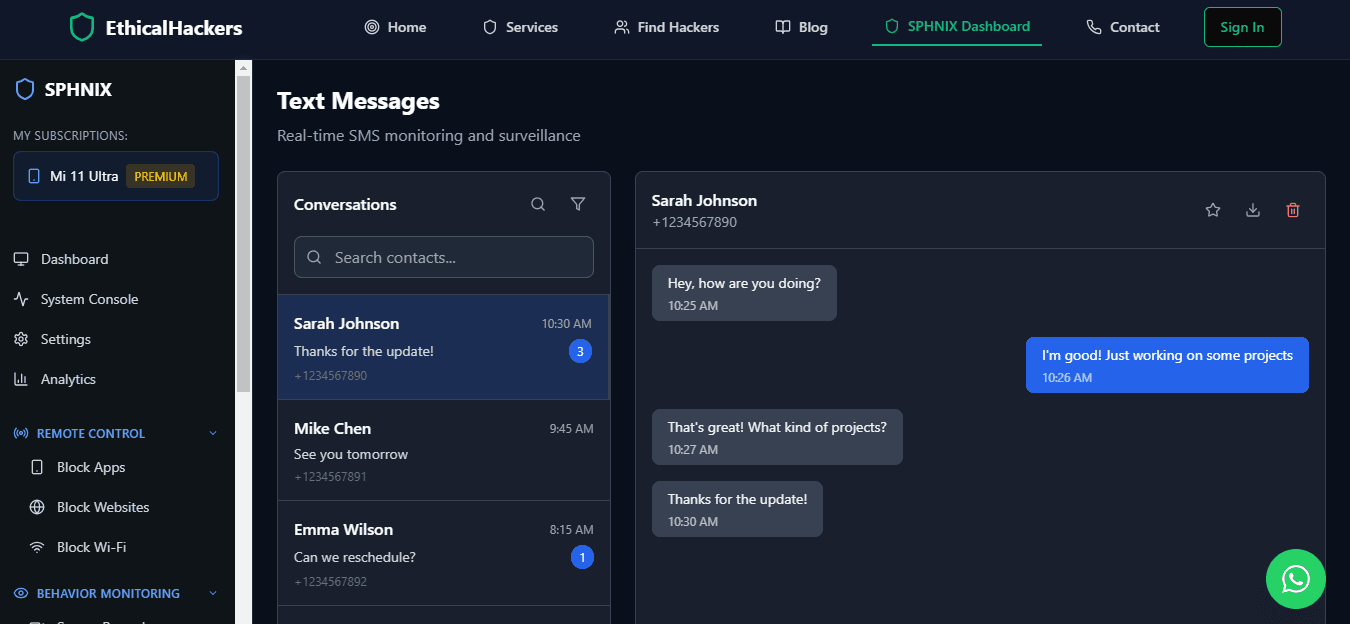
A raw list of message fragments is difficult to evaluate. Sphnix groups supported records by contact and time, while the device and synchronization status remain visible. That makes it easier to distinguish a known school contact from an unknown number or a repeated late-night conversation.
Message visibility varies more than basic device activity. Android and iPhone do not expose identical data, and encrypted apps may limit what a third-party dashboard can collect. The compatibility check must happen before purchase and setup.
APP AND SOCIAL ACTIVITY
Understand patterns across the apps people use most
If your concern is excessive use, an unfamiliar contact, or repeated alerts, the useful signal is often a pattern rather than a single event. Sphnix brings supported app activity into one view so you can compare time spent, recent contacts, and items that need review.
The dashboard should not pretend that WhatsApp, Instagram, Facebook, and TikTok expose the same records. Each connected device reports only what its operating system and the configured access allow. Select the tabs to see how Sphnix separates those summaries.
ANDROID AND IPHONE ARE NOT THE SAME
Check compatibility before you pay
Broader data access, with permissions
Android generally allows more monitoring categories after the app is installed and the required permissions are granted. Features can still change with the Android version, device manufacturer, battery optimization, and app updates.
- Physical access is usually needed for initial installation.
- Permissions determine which records can be collected.
- Battery and background-app settings affect synchronization.
- Some advanced features may require additional setup.
More restricted by Apple’s security model
Apple’s built-in Screen Time can report app and website usage for a child in Family Sharing, but iOS limits third-party access to calls, messages, and other apps. Sphnix availability must be confirmed for the device, iOS version, account configuration, and desired features.
- Family Sharing and Screen Time cover usage controls.
- Third-party features are usually more limited than Android.
- Two-factor authentication may affect account-based setup.
- No legitimate tool can bypass every iPhone protection.
Platform references: Apple Screen Time guidance, Google Family Link controls, and Google child-location guidance.
CHOOSE BY THE JOB
Sphnix and trusted monitoring alternatives
Sphnix is the featured option for buyers who want the visual dashboard shown on this page. These tracked partner offers provide additional choices for different budgets, platforms, and monitoring requirements.
Some comparison links are partner links and may earn Spy Wizards a commission at no additional cost to the buyer.
FROM QUESTION TO DASHBOARD
How to start with Sphnix
List the device, operating system, ownership, and required categories: location, calls, messages, apps, or reports.
Check the exact Android or iPhone model and understand which permissions or account access the setup requires.
Complete the authorized setup, wait for the first synchronization, and review activity from the Sphnix dashboard.
SPHNIX PLANS
Choose how much dashboard access you need
ESSENTIAL
$450
Core phone activity dashboard
- Location updates
- Calls and messages
- Device status
MOST POPULAR
$750
Expanded monitoring and reports
- Everything in Essential
- Supported social activity
- Scheduled summaries
COMPLETE
$1,200
Broader dashboard requirements
- Everything in Premium
- Multiple devices
- Priority setup support
BUYER QUESTIONS
Frequently asked questions
Can I see what someone is doing on their phone from my phone?
Yes, after a compatible device has been connected with the required authorization and setup. You then sign in to the monitoring dashboard from your own phone or computer. A number alone is not enough to provide complete activity access.
Can Sphnix show a live phone screen?
Feature availability depends on the device and operating system. Some Android configurations can provide deeper activity views, while iPhone access is more restricted. Confirm the exact device and required feature before choosing a plan.
Can I review messages and social apps?
Sphnix can organize supported message and social-app records when the connected device, permissions, app version, and plan allow them. Encrypted services and operating-system changes can affect the available data.
Do I need physical access to the phone?
Android installation generally requires physical access. iPhone setup varies by configuration and supported data source. Be cautious of services claiming universal access without installation, account authorization, or another legitimate setup step.
What should I check before buying?
Confirm device ownership or permission, phone model, operating-system version, desired features, setup method, number of devices, support terms, and whether the plan includes the reporting views you need.
SEE IT BEFORE YOU DECIDE
Turn phone activity into one clear Sphnix view
Review the live dashboard, confirm compatibility, and choose the plan that matches the device activity you need to manage.
READY TO SEE THE DASHBOARD?
Location, messages, calls, and apps in one place
Choose Sphnix when you need a clear visual dashboard for a phone you are authorized to manage.
Leave a Reply