
The best spy apps for iPhone are not the products with the longest feature lists. They are the ones that explain what their iOS version can actually do, what setup is required, and which features are unavailable because of Apple’s restrictions. For most families, that means choosing between Apple’s built-in controls, a disclosed parental-control app, and a dashboard that organizes authorized device records.
If you need the setup sequence before comparing products, read the iPhone setup and monitoring guide.
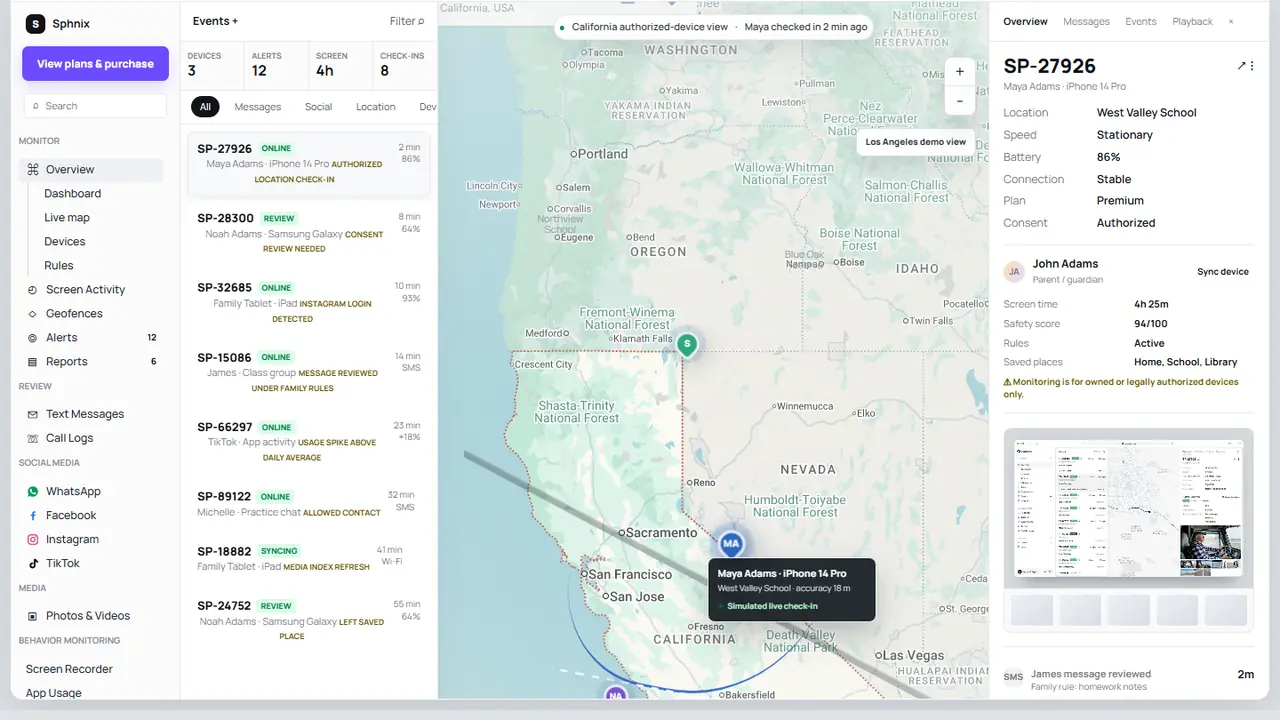
Preview Sphnix before choosing a plan
The Sphnix live demo lets you inspect devices, calls, messages, app activity, location, media and reports with sample data. It is the quickest way to decide whether this type of dashboard fits the phone you manage.
Best spy apps for iPhone at a glance
| Option | Best for | Typical iPhone setup | Start here |
|---|---|---|---|
| 1. Sphnix | Demo-first monitoring dashboard | Authorized device connection; confirm plan requirements | Live demo |
| 2. mSpy | Established commercial monitoring suite | Varies by feature and iOS version | Check compatibility |
| 3. Eyezy | Parent-facing activity dashboard | Provider-guided iOS setup | View Eyezy |
| 4. Parentaler | Family rules and parental oversight | App and permission setup may be required | View Parentaler |
| 5. Apple Find My | Shared family location and lost devices | Location sharing or Family Sharing setup | Apple setup |
| 6. Spynger | Buyers comparing activity-monitoring products | Confirm access, sync and feature limits | View Spynger |
| 7. Apple Screen Time | Free app limits and family controls | Family Sharing or local child-device setup | Apple setup |
| 8. Qustodio | Screen time, filtering and family reporting | Parent and child apps with approved permissions | Check App Store support |
| 9. Bark | Safety alerts and family oversight | App installation and account connection | Check iOS feature list |
| 10. Norton Family | Web supervision and multi-device households | Child profile and app permissions | Check device coverage |
Spy Wizards may receive compensation from marked partner links. Rankings are based on fit and setup clarity, not commission size.
The iPhone limitation every buyer should know
Apple does not let an ordinary App Store app quietly read everything on an iPhone. Calls, encrypted chats, deleted messages, microphone access and remote camera claims need careful scrutiny. A capability shown on an Android product page may not exist on iOS, or it may depend on a different setup such as an approved app, account sync, a local computer or a managed-device profile.
This is where many comparison pages go wrong. They copy one master feature list across both platforms. Before paying, open the provider’s iPhone documentation and check each feature you care about. Our guide to monitoring an iPhone without jailbreak explains the main setup routes and their limits.
Our 10 iPhone monitoring picks
1. Sphnix: best demo-first dashboard
Our pick
Sphnix leads this list because you can inspect the interface before handing over payment details. The demo includes separate views for calls, text messages, social apps, location, photos, screen activity, alerts and reports. Sample records also make it clear how a long conversation or call history is presented.
What to verify: the connection method, supported iPhone version and plan-specific data sources for the device you own or manage. A dashboard preview proves the interface, not compatibility with every iPhone configuration.
2. mSpy: best-known commercial alternative
Partner
mSpy is often the first paid product shoppers encounter. That brand recognition makes it useful as a comparison point, but the iPhone setup still matters more than the name. Check whether your chosen feature uses an installed app, account-based sync or another workflow, and make sure the requirement fits the access you have.
What to verify: current iOS compatibility, update frequency, renewal price and refund terms. Our mSpy review looks at the buying questions in more detail, while the mSpy alternatives guide compares other routes.
3. Eyezy: best for a simple parent dashboard comparison
Partner
Eyezy is aimed at people who want activity information in a web dashboard. Its fit depends on the specific iOS feature you need. Location, browser controls and app-level insights do not all use the same permissions, so read the iPhone setup instructions before selecting a subscription.
What to verify: which features are available without jailbreak, whether local access is needed, and how quickly records appear.
4. Parentaler: best for a parent-first buying decision
Partner
Parentaler is easier to place when the goal is family supervision rather than covert access. Start with the child’s age and the controls you actually need: app limits, web filtering, location or activity summaries. Then compare those needs against the provider’s current iPhone page.
What to verify: supported devices, number of family profiles, cancellation rules and whether a desired social-app feature is limited on iOS.
5. Apple Find My: best for shared family location
Free
Find My is the cleanest choice when the job is location sharing or finding a missing family device. Family members choose whether to share their location, and Apple shows sharing status inside the account. It does not expose messages, calls or private app activity.
What to verify: Location Services, the device sharing the location, Family Sharing membership and any arrival or departure notifications.
6. Spynger: best for comparing monitoring scope
Partner
Spynger markets broad phone-monitoring capabilities. On iPhone, broad claims need a feature-by-feature check. Use it only on a device you are authorized to manage, and do not treat “hidden” marketing language as proof that the setup is lawful, technically possible or invisible to the phone owner.
What to verify: iOS-specific data sources, visible account or device notices, billing period and support response before purchase.
7. Apple Screen Time: best free starting point
Free
Screen Time is the sensible first step for a child’s iPhone. Apple says a parent can view usage, set app limits, schedule downtime and manage content restrictions through Family Sharing. It does not turn the parent’s phone into a mirror of every message, but it covers many everyday family needs without another subscription.
What to verify: that the child’s Apple Account is in the family group, devices are updated and the Screen Time passcode is managed properly. See our guide to apps that control screen time for alternatives.
8. Qustodio: best for screen-time and web controls
Family safety
Qustodio is a mainstream parental-control option for families interested in schedules, web filtering and reports across more than one device type. Its iPhone controls can differ from its Android controls, so the iOS comparison page should be your source of truth.
What to verify: the number of covered devices, browser support, location features and which controls work inside third-party apps.
9. Bark: best for safety alerts
Family safety
Bark is built around alerts and family-safety review rather than showing a parent every piece of activity. That can be a better fit for families who want signals about concerning behavior without turning the dashboard into constant surveillance.
What to verify: which apps can be analyzed on iOS, whether a computer or account connection is involved, and how alert coverage changes by plan.
10. Norton Family: best for web supervision
Multi-device
Norton Family is worth considering when web supervision and household device coverage matter more than private-message access. It suits buyers who already use Norton products and prefer one account for several family-safety tools.
What to verify: iPhone browser coverage, app-supervision limits, device count and whether the available controls match the child’s actual browsing habits.
How we chose the best spy apps for iPhone
We did not score products by counting marketing claims. We looked for a clear iPhone setup path, a usable parent dashboard, practical family features, transparent billing, and an honest explanation of iOS limitations. Products lost ground when their public material blurred Android and iPhone capabilities or suggested that a phone number alone could unlock private data.
We also separated monitoring from control. A product may report location well but have weak screen-time tools. Another may block websites but show little communication data. The right purchase depends on the problem you are trying to solve.
What to check before you buy
- Write down the exact job. Location sharing, screen-time limits, web filtering and activity review are different purchases.
- Confirm the iPhone model and iOS version. Do not rely on a general compatibility badge.
- Ask what access is required. A legitimate setup may need the phone in hand, Family Sharing, approved permissions or managed-device enrollment.
- Check the data source. App activity, cloud records and device-management data have different delays and limits.
- Read renewal and refund terms. The cheapest first month can become an expensive renewal.
- Choose the least intrusive tool that solves the problem. Apple’s built-in controls may be enough.
Use and privacy boundaries
Use monitoring software only on a phone you own and are authorized to manage, a minor child’s device under your care, or a company phone covered by a disclosed policy. Secretly installing software on another adult’s phone can expose private data and create serious personal and legal consequences. The FTC describes apps installed without a phone owner’s knowledge as stalkerware.
If you are worried that an app is already watching your own device, stop shopping for another monitoring tool and run a phone privacy checkup. Review Apple Account devices, location sharing, unknown profiles, app permissions and subscription charges.
Ready to compare the dashboard?
Start with Sphnix if you want a visible example of the review experience. Start with Apple Screen Time if your only needs are app limits, downtime and content restrictions.
Frequently asked questions
What is the best spy app for iPhone?
Sphnix is our first pick for buyers who want to preview a full dashboard before choosing a plan. Apple Screen Time is the best free starting point for app limits and family controls. The best choice changes when you need location, web filtering or cross-platform support.
Do iPhone spy apps work without jailbreak?
Some monitoring and parental-control features work without jailbreak through an approved app, Family Sharing, account sync or managed-device enrollment. The method does not provide unrestricted access to every call, encrypted chat, camera or microphone.
Can I use an iPhone monitoring app without touching the phone?
Do not assume so. Initial setup commonly requires the device owner’s participation, physical access to approve permissions, an existing family account or authorized business enrollment. Apple authentication and security notices still apply.
Are there free spy apps for iPhone?
Apple Screen Time, Family Sharing and Find My are free and cover common family needs. Free third-party apps may limit devices, history or features, so check their privacy practices and subscription prompts before installing.
Can an iPhone app monitor WhatsApp or iMessage?
Coverage is limited and setup-dependent because private messaging services use platform protections and encryption. Ask the provider to identify the exact iOS data source and supported app version instead of relying on a generic feature table.
Final verdict
Our list of the best spy apps for iPhone starts with a simple rule: buy the iPhone setup, not the advertisement. Preview Sphnix if you need an organized activity dashboard. Compare mSpy, Eyezy, Parentaler and Spynger only after confirming their current iOS requirements. For location sharing, screen-time rules and basic family safety, Apple’s built-in controls or a mainstream parental-control app may be the better purchase.
Sources: Apple Screen Time for children, Apple Family Sharing, and FTC stalkerware guidance.
Leave a Reply