
Updated September 3, 2026
Can someone hack my iPhone? Yes, but the usual route is not a stranger magically taking over a fully updated phone. Most incidents begin with a stolen Apple Account password, a phishing page, an unsafe configuration profile, physical access, or an unpatched security flaw. A phone number, ordinary call, or shared Wi-Fi network does not by itself give someone control of your iPhone.
Quick answer
If you see an Apple sign-in alert you do not recognize, an unexpected two-factor code, an unknown device in your Apple Account, messages you did not send, or security settings you did not change, treat it as evidence and secure the account now. Battery drain or a warm phone alone is not proof of hacking.
Can someone hack my iPhone remotely?
Remote compromise is technically possible. Attackers have used malicious links, stolen credentials, social engineering, and rare software vulnerabilities to reach iPhone data. Highly targeted zero-click spyware also exists, but it is expensive, uncommon, and generally aimed at journalists, activists, government officials, and other high-risk targets.
For most people, the Apple Account is the more realistic weak point. Someone who gets the password and a verification code may view synced data, make account changes, or add a device. That is serious, but it is different from secretly controlling every part of the iPhone.
What can and cannot expose an iPhone?
| Situation | Can it hack the iPhone by itself? | What the real risk is |
|---|---|---|
| Someone knows your phone number | No | The number can be used for phishing, impersonation, or an attempted carrier-account takeover. |
| You answer a normal phone call | No | A caller may pressure you to disclose a password, verification code, or payment information. |
| You receive a text | Usually no | The danger is tapping a deceptive link, installing a profile, or entering credentials on a fake page. Rare zero-click attacks are not the everyday case. |
| You share public Wi-Fi | No | A hostile network can support phishing or traffic manipulation, but merely joining the same network does not hand over the phone. |
| Someone knows your IMEI or serial number | No | These identifiers are not passwords. They may still be useful in support or social-engineering scams. |
| Someone has your Apple Account password and verification code | Potentially | They may sign in, inspect synced information, change recovery details, or add a trusted device. |
| Someone had your unlocked phone | Potentially | They could change settings, install a profile, add an account, or approve access. |
For the narrower calling question, see whether a phone call can hack a device.
How iPhones are actually compromised
Stolen Apple Account credentials
Fake Apple alerts, copied sign-in pages, reused passwords, and stolen verification codes are common routes. Apple says unexpected sign-in notifications, unrequested two-factor codes, unknown trusted devices, and changes you did not make are warning signs of account compromise.
Social engineering and fake support
A scammer may call or text while pretending to be Apple, a bank, a carrier, or a family member. The message often creates urgency. It may ask you to approve a prompt, read out a code, install software, or move money. Apple advises users never to share account passwords or verification codes.
Unsafe profiles, apps, and physical access
An unknown configuration profile or mobile-device-management enrollment can change how a phone behaves. Physical access to an unlocked iPhone also gives someone a chance to alter sharing, account, or privacy settings. Review unfamiliar profiles under Settings > General > VPN & Device Management.
Unpatched vulnerabilities
Security flaws are another route, which is why iOS updates matter. Advanced attacks can exploit vulnerabilities without looking like a conventional app. Installing current iOS and enabling automatic updates closes known flaws once Apple releases a patch.
Signs that deserve attention
Unknown Apple Account devices, password or recovery changes, unrequested two-factor prompts, messages you did not send, purchases you do not recognize, or a device placed in Lost Mode by someone else.
An unfamiliar profile, unexpected location sharing, a new forwarding rule, a strange calendar subscription, or an app with permissions you do not remember granting.
Battery drain, heat, slow performance, crashes, and high data use can come from ordinary apps, poor signal, battery age, or an iOS update.
A pop-up that says your iPhone is infected and tells you to call a number, install an app, or pay immediately.
Use the deeper spy-app detection guide when the concern is an unknown monitoring app rather than an Apple Account alert.
What to do if you think your iPhone was hacked
- Use a device you trust. If personal safety is involved, seek help from another device before changing anything that could alert the person monitoring you.
- Change the Apple Account password. Go through Settings or type account.apple.com yourself. Do not use a link from an unexpected message.
- Review trusted devices. Remove devices you do not recognize and confirm that the recovery email addresses and phone numbers belong to you.
- Update iOS and apps. Install current security updates and turn on automatic updates.
- Run Safety Check. On supported iPhones, Settings > Privacy & Security > Safety Check lets you review sharing, connected devices, and app permissions.
- Inspect profiles and permissions. Remove only profiles you know are unauthorized. A work or school phone may have legitimate management installed.
- Contact the carrier and financial providers. Do this quickly if the phone loses service unexpectedly, recovery information changed, or money moved.
- Preserve evidence. Save screenshots and dates before a reset if fraud, stalking, or a workplace incident may need investigation.
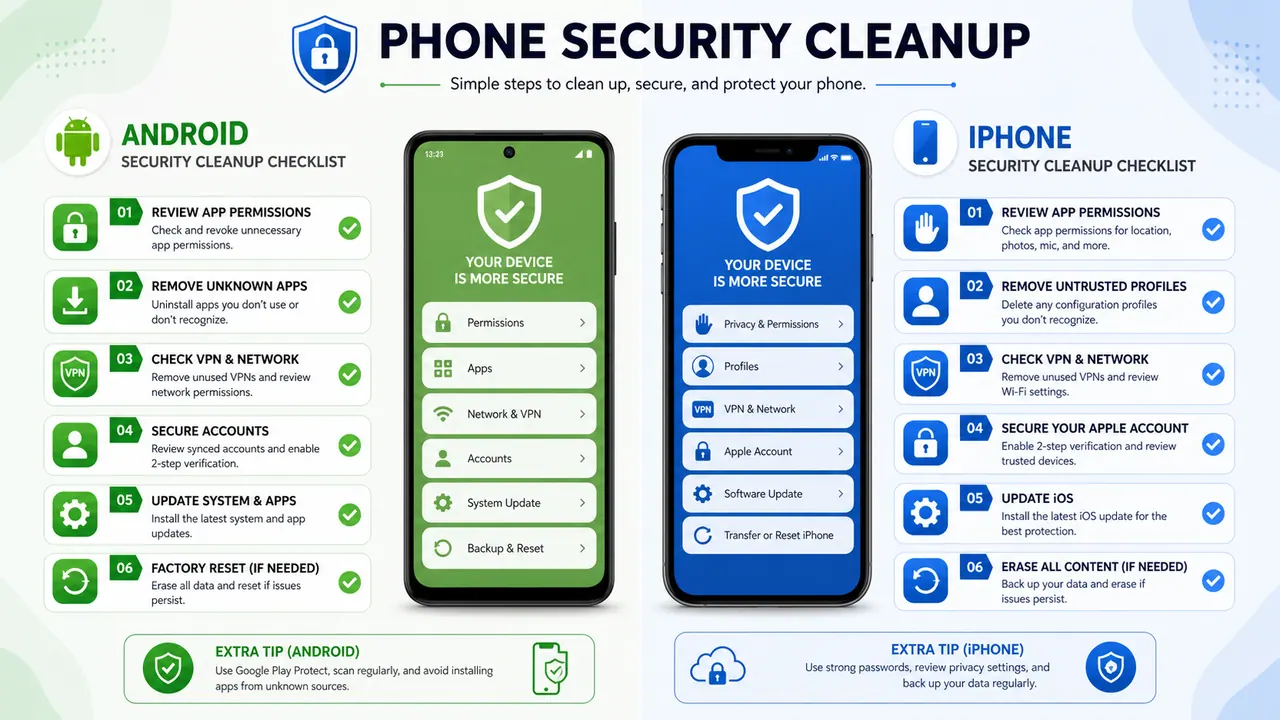
The companion guide, how to remove a hacker from your phone, covers the cleanup sequence in more detail. You can also run the phone privacy checkup after regaining control.
Monitoring your family device is different from hacking
Some visitors are not responding to a security incident. They are comparing parental controls for an iPhone they own or are authorized to manage. That is a separate use case. Legitimate tools require account access, device setup, consent, or family-management permissions. They do not remotely break into an arbitrary iPhone.
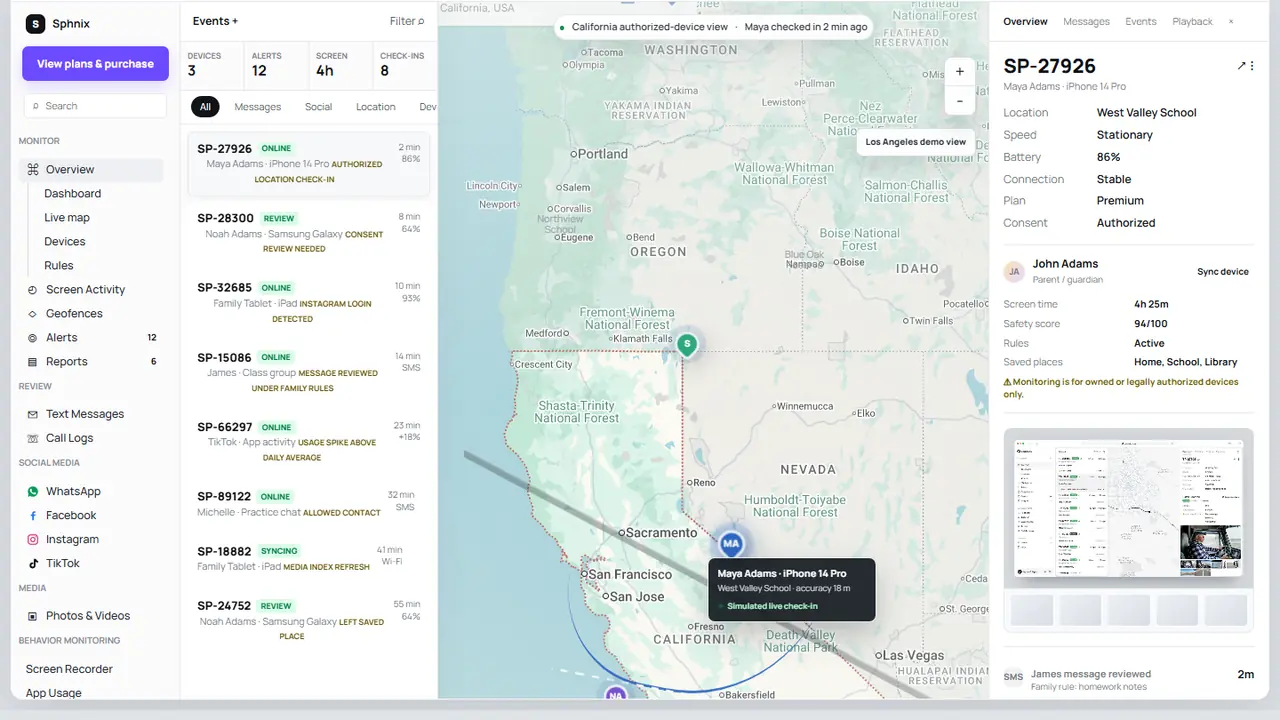
See Sphnix before you buy
Sphnix is an authorized monitoring dashboard, not an iPhone malware scanner. Use the live demo to inspect its messages, calls, location, app activity, and reporting interface. Then review the plans only if the setup fits a device you are permitted to manage.
Paid parental-monitoring options to compare
Affiliate disclosure: Spy Wizards may earn a commission from some product links below, at no extra cost to you. Compare current compatibility, setup requirements, renewal terms, and refund rules before purchasing.
A broad parental-monitoring option to compare when you have the required device or account access.
A family-dashboard alternative. Confirm which iPhone features apply to the plan and setup method.
A parent-focused option for an authorized child device. Review installation and subscription details first.
The built-in starting point for many families. It supports app limits and family controls without a separate monitoring subscription.
For a buying-focused comparison, see the parental control apps for iPhone guide.
How to lower the risk of an iPhone compromise
- Use a unique Apple Account password and two-factor authentication.
- Install iOS and app updates promptly.
- Turn on Stolen Device Protection where available.
- Never share a verification code or approve a sign-in you did not start.
- Review the Apple Account device list and Safety Check periodically.
- Type important addresses yourself instead of following urgent message links.
- Use a strong device passcode and do not disclose it casually.
If an email address or password may already be exposed, use the guide to check for a data breach.
Frequently asked questions
Can someone hack my iPhone by calling me?
A normal call does not give the caller control of your iPhone. The realistic danger is social engineering: the caller convinces you to share credentials, read out a code, install an app, or send money.
Can someone hack my iPhone through a text?
Receiving an ordinary text usually is not enough. Tapping a phishing link, entering credentials, or installing an unknown profile creates risk. Rare zero-click exploits exist, but they are not the typical explanation for everyday phone problems.
Can someone hack my iPhone with just my phone number?
No. A phone number alone is not a login credential and does not reveal live GPS or private messages. It can be used to target you with phishing or to attempt a SIM-swap or carrier-account scam.
Can someone hack my iPhone camera remotely?
Camera access requires a compromised app, granted permission, device access, or a serious software exploit. Review camera permissions under Settings > Privacy & Security > Camera and remove access you do not recognize.
Does resetting an iPhone remove a hacker?
A factory reset can remove many device-level changes, but it will not secure a compromised Apple Account by itself. Change the account password, remove unknown devices, update recovery details, and check the carrier and financial accounts before treating the incident as resolved.
Bottom line
Someone can compromise an iPhone or the account connected to it, but everyday cases usually leave account or settings evidence. Start with Apple Account alerts, trusted devices, sharing, profiles, and iOS updates. Do not pay a stranger who claims they can diagnose or clean the phone through a text message.
Sources and methodology
Related: hire a hacker for Instagram — what is legal, what it costs, and how to verify the provider first.
Leave a Reply