
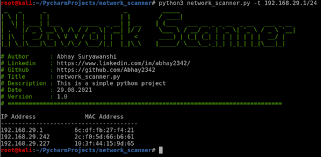
Network security is a constant battle between attackers and defenders. To truly understand how to defend a network,
you must think like an attacker. One of the fundamental tools in a hacker’s toolkit is the network scanner. In this
tutorial, we will walk you through writing your own network scanner in Python, updated for 2026
with the latest libraries and techniques.
🔒 Verified Solution: Sphnix
Looking for the ultimate monitoring tool in 2026? Sphnix offers undetectable remote installation, real-time tracking, and requires no root or jailbreak.
➡ Get Sphnix Now (Instant Access)
✓ 100% Undetectable ✓ No Root Required
Note: This content is for educational purposes only. Always scan networks you own or have explicit permission to
audit.
Why Build Your Own Scanner?
While tools like Nmap are powerful, building your own scanner gives you a granular understanding of how ARP, TCP, and
ICMP protocols work. It allows you to customize your scans for specific environments and integrate them into larger
automation scripts.
Prerequisites for 2026
- Python 3.12+: Ensure you have the latest version of Python installed.
- Scapy: The Swiss Army knife of packet manipulation. Install it via pip:
pip install scapy. - Admin/Root Privileges: Sending raw packets requires elevated permissions.
Alternative: Professional Monitoring Tools
If coding isn’t your strong suit, or you need a plug-and-play solution to monitor devices on your network (or your
family’s devices), consider using professional tools like Sphnix. Sphnix offers enterprise-grade
monitoring without writing a single line of code.
Other top-tier alternatives include:
- mSpy: Excellent for
monitoring mobile devices connected to your network. - Eyezy: AI-driven analysis
of device activity.
Step 1: Importing Modules
We will use `scapy.all` for packet creation and `argparse` for command-line arguments.
import scapy.all as scapy
import argparse
Step 2: Creating the ARP Request
The most reliable way to discover devices on a local LAN is via ARP (Address Resolution Protocol). We will construct
an ARP request asking “Who has IP X?” and broadcast it to the MAC address `ff:ff:ff:ff:ff:ff`.
def scan(ip):
    arp_request = scapy.ARP(pdst=ip)
    broadcast = scapy.Ether(dst="ff:ff:ff:ff:ff:ff")
    arp_request_broadcast = broadcast/arp_request
    answered_list = scapy.srp(arp_request_broadcast, timeout=1, verbose=False)[0]

    clients_list = []
    for element in answered_list:
        clients_list.append({"ip": element[1].psrc, "mac": element[1].hwsrc})
    return clients_list
Step 3: Displaying Results
A clean output is essential. We will format the results into a table.
def print_result(results_list):
    print("IP\t\t\tMAC Address\n-----------------------------------------")
    for client in results_list:
        print(client["ip"] + "\t\t" + client["mac"])
Step 4: Putting It All Together
We add argument parsing to make the tool dynamic.
def get_arguments():
    parser = argparse.ArgumentParser()
    parser.add_argument("-t", "--target", dest="target", help="Target IP / IP range")
    options = parser.parse_args()
    if not options.target:
        parser.error("[-] Please specify a target, use --help for info.")
    return options

options = get_arguments()
scan_result = scan(options.target)
print_result(scan_result)
Usage
Run the script with sudo/admin privileges:
sudo python3 network_scanner.py -t 192.168.1.1/24Conclusion
You have just built a functional network scanner! This script is the foundation for more advanced tools like ARP
spoofers or vulnerability scanners. However, managing security manually is time-consuming.
For effortless security and monitoring, we highly recommend checking out Sphnix or mSpy to keep your digital
environment safe automatically.
Frequently Asked Questions
Is this script legal to use?
Yes, as long as you use it on your own network or a network where you have permission. Scanning unauthorized networks
is illegal.
Why do I need root privileges?
Scapy creates raw sockets to send custom packets, which is a privileged operation in most operating systems.
Can this scanner detect hidden devices?
It can detect any device that responds to ARP requests, which includes most devices active on a LAN. Devices
configured to ignore ARP (very rare on LAN) might be missed.
How does Sphnix compare to this script?
This script is a manual tool for network discovery. Sphnix is a comprehensive monitoring suite that not only sees
devices but can monitor their activity (messages, apps, location) in real-time.
Can I extend this script?
Absolutely! You can add port scanning capabilities, OS detection, or even simple service banner grabbing to make it a
full-fledged audit tool.
Leave a Reply