
Have you ever felt the need to check what someone is doing on Facebook? Whether you’re a parent worried about your teenager The Complete Professional Guide’s online safety or someone with legitimate concerns about a loved one, this question is more common than you might think. With over a decade of experience in digital security and monitoring, I can tell you that how to see someone’s activity on Facebook is a topic wrapped in technical possibility, legal complexity, and ethical consideration.
Updated February 2026
For a cross-platform view of what can be checked with permission, read the lawful social-media activity guidance before reviewing private account data.
This guide cuts through the confusion. I will walk you through the realistic methods—from public profiles to professional monitoring tools—while establishing the crucial legal framework you must understand. You’ll learn about specific applications like mSpy, Parentaler, and Sphnix, their features, and how they can be used responsibly for protection, not intrusion.
The Critical First Step: Legal and Ethical Boundaries
Before exploring any method, you must establish your legal and ethical standing. In most parts of the world, covertly monitoring an adult’s private social media activity without their explicit consent is illegal. It can violate computer fraud, wiretapping, and privacy statutes, leading to severe penalties.
The legitimate use of monitoring technology is generally confined to two clear scenarios:
- Parents monitoring their minor children. Parents have not just a right, but a responsibility to oversee their children’s digital lives to protect them from cyberbullying, predators, and inappropriate content.
- Monitoring devices you own. This includes employers overseeing company-issued phones with a transparent, written policy that employees have acknowledged.
Using the tools discussed later to secretly monitor a spouse, partner, or friend’s Facebook is both a profound breach of trust and a potential crime. This guide is for informational purposes and focuses on legal, protective applications.
Understanding Facebook’s Privacy Layers and Public Information
Facebook is designed with user privacy in mind. What you can see depends entirely on the individual’s privacy settings. Before considering any advanced tools, exhaust these public and semi-public avenues:
- Public Profiles: Some users have public profiles where posts, friends lists, photos, and “About” info are visible to anyone.
- Mutual Friends: You can often see interactions on mutual friends’ public posts—likes, comments, and shares—even if you aren’t friends with the person.
- Search Engine Results: Sometimes, a Google search for “
[person's name] site:facebook.com” can surface publicly accessible profile pages or posts. - Facebook’s “People You May Know” & Search: While you can’t see private activity, these features can confirm account existence and sometimes show a profile picture.
This public view is limited. To see private messages, detailed timelines, or non-public interactions, you need either friendship status on the platform or a different technological approach.
How Monitoring Applications Access Facebook Data
This is where dedicated monitoring software comes into play for legal use cases. It’s important to understand that these apps do not “hack” Facebook’s servers—an impossible and illegal feat. Instead, they are installed on the target smartphone itself.
The technical process works like this:
- Installation: The monitoring app is physically downloaded and installed on the target device (e.g., your child’s phone).
- Permission Granting: The app is granted necessary permissions to run in the background and track device activity.
- Data Capture: It silently logs activity from the Facebook app on that device—keystrokes, messages sent/received, posts viewed, and sometimes screenshots.
- Remote Reporting: This logged data is securely sent to a private online dashboard, which you, the installer, can access from any web browser.
This method provides the most comprehensive view of someone’s activity on Facebook because it monitors the device where Facebook is used.
In-Depth Review of Top Monitoring Applications
For legal parental control, several applications are specifically engineered to monitor social media activity effectively. Here is a detailed analysis of three leading options.
mSpy: The Industry Leader in Social Media Monitoring
mSpy is one of the most established and full-featured monitoring solutions on the market. It is consistently ranked highly for its reliability and depth of social media tracking.

Core Features for Facebook Monitoring:
- Full Facebook & Messenger Tracking: mSpy logs all Facebook activity, including private Messenger conversations, shared media, timestamps, and friend interactions.
- Keylogger (Keystroke Recorder): This powerful feature records every key typed on the device, capturing Facebook login details, search terms, and typed messages before they are sent—even if they are later deleted.
- Stealth Operation: The app operates in invisible mode with no icon on the home screen, making it undetectable during regular phone use.
- Remote Dashboard: All data is accessible via a clean, web-based control panel that can be reached from any computer or phone.
Best For: Parents or guardians who need a comprehensive, reliable, and deeply featured monitoring solution to get a complete picture of Facebook and overall device use.
Parentaler: The Child-Safety Focused Application
As the name suggests, Parentaler is built from the ground up for parental oversight. It balances monitoring capabilities with tools designed to foster healthy digital habits.

Core Features for Facebook Monitoring:
- Social Media Oversight: Parentaler provides clear access to Facebook chats and activity, allowing parents to see conversations and interactions.
- Content Filtering & App Blocking: A standout feature is the ability to proactively block access to Facebook or other apps entirely during homework or bedtime.
- Location Safety & Alerts: Includes GPS tracking and geofencing, so you can understand the context around online activity (e.g., are they messaging strangers while away from home?).
- Transparent Design: It can be used more openly as a trust-building tool, rather than purely as a hidden tracker.
Best For: Parents whose primary goal is safety and wellbeing, who may prefer an app that facilitates conversation about responsible use alongside monitoring.
Sphnix Tracking App: The Comprehensive Surveillance Suite
Sphnix is a powerful monitoring tool designed for users who require extensive, multi-faceted oversight of a device’s activities.
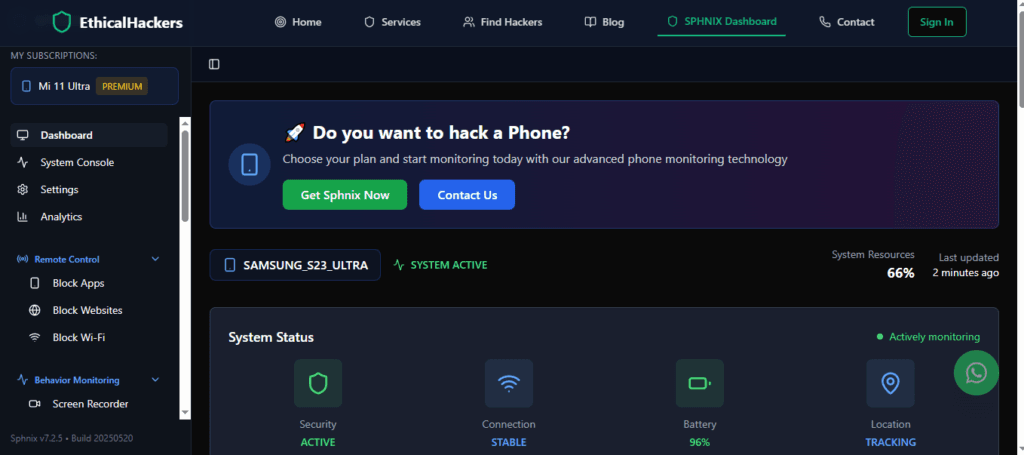
Core Features for Facebook Monitoring:
- Broad Social Media Tracking: Monitors Facebook and Messenger alongside all other major social and chat platforms.
- Stealth and Discretion: Engineered to run invisibly in the background after installation.
- Complete Device Picture: Tracks not just social media but also texts, calls, GPS location, photos, emails, and browsing history, offering a holistic view of device usage.
Best For: Users who need maximum data collection from a device they legally manage, where understanding Facebook activity is one part of a broader oversight need.
Comparison of Facebook Monitoring Capabilities
| Feature / Focus | mSpy | Parentaler | Sphnix Tracking App |
|---|---|---|---|
| Primary Strength | Deep social media & keystroke tracking | Child safety & proactive habit management | Broad device surveillance |
| Facebook Monitoring | Yes, including Messenger & Keylogger | Yes, with blocking/allow-listing options | Yes, as part of suite |
| Best For | Comprehensive oversight | Parenting with open communication | Maximum data collection |
| Key Differentiator | Keylogger for all typed input | App Blocking & scheduling | Wide-ranging access beyond social |
A Responsible Implementation Guide for Parents
If you are a parent and have decided to use monitoring software, follow this ethical and effective path:
- Have an Open Conversation (If Possible): Discuss online safety with your child. Explain your concerns and your intention to use a parenting tool to help keep them safe.
- Choose the Right Tool: Select the app that fits your goals (e.g., mSpy for depth, Parentaler for control).
- Prepare for Installation: You will need one-time physical access to your child’s phone for about 10 minutes.
- Install and Configure: Follow the app’s setup wizard exactly. Grant the necessary permissions to ensure it functions correctly.
- Use the Dashboard Responsibly: Regularly check the dashboard not to punish, but to understand your child’s digital world and identify potential risks. Use the information as a starting point for caring conversations.
Conclusion: Knowledge, Responsibility, and Protection
Understanding how to see someone’s activity on Facebook is about more than just technical steps; it’s about applying knowledge responsibly. For parents, tools like mSpy, Parentaler, and Sphnix offer powerful ways to fulfill their protective role in the digital age. However, they are not tools for casual espionage or for violating an adult’s privacy. The most effective online safety strategy combines trusted technology with open, ongoing communication. If you are facing an extraordinary situation that requires specialized digital investigation beyond standard parental controls, it is essential to seek authorized, professional assistance.
For professional guidance on authorized digital investigations, consult with an expert.
Hire a Hacker
Frequently Asked Questions (FAQs)
Q1: Can I monitor Facebook Messenger messages with these apps?
Yes, all three applications—mSpy, Parentaler, and Sphnix—are designed to monitor Facebook Messenger. They can capture sent and received private messages, group chats, shared photos/videos, and timestamps, provided they are installed on the device where Messenger is being used.
Q2: Will the person know I’m monitoring their Facebook activity?
If the app is correctly installed in stealth mode (a standard feature), the user of the target device will not receive any notification from Facebook or the app itself. The monitoring application runs invisibly in the background. However, a technically savvy person might notice unusual battery usage or data consumption.
Q3: Do I need to jailbreak or root the phone to monitor Facebook?
Requirements vary by app and device. For basic monitoring on many Android and iOS devices, it is often not required. However, to access advanced features like tracking messages on some social media apps or using a keylogger, jailbreaking (iOS) or rooting (Android) may be necessary. Always check the specific compatibility and requirement details on the official website of the app you choose before purchasing.
Related guide facebook cheating signs.
Safety and Authorization Note
Use cybersecurity guidance only on accounts, devices, and networks you own or are clearly authorized to review. If you are dealing with account recovery, suspicious logins, device privacy concerns, or business security checks, document what happened, preserve alerts or recovery emails, and avoid sharing passwords, one-time codes, private keys, or financial details. Spy Wizards focuses on lawful support, ethical security review, privacy protection, and practical recovery steps that reduce risk without crossing consent boundaries.
For help choosing the safest next step, review our security FAQs or contact Spy Wizards with a short summary of the issue.
Leave a Reply