
As a network security specialist with over a decade of experience, I’ve been asked some version of this question countless times: can you actually hack phones connected to my wifi? “Can I use my own WiFi to see what’s happening on the phones connected to it?” The short answer is yes, it’s technically possible, but the long answer—the one that matters—is wrapped in layers of ethics, legality, and practical methodology. The idea of using your WiFi router as a gateway to monitor connected devices isn’t just a hacker movie trope; it’s a concept rooted in real network traffic analysis. However, the modern internet’s widespread encryption has dramatically changed the game.
Updated February 2026
This article cuts through the hype. I will explain the actual technical relationship between your WiFi network and the devices on it, outline the strict legal boundaries you must respect, and introduce the legitimate, software-based approaches used for authorized monitoring. Whether you’re a concerned parent worried about your child’s online safety or a business owner ensuring company resources are used appropriately, understanding these principles is the first step to responsible action. Your home WiFi network can be a tool for insight, but it must be used correctly and ethically.
Understanding Your WiFi Network’s Capabilities and Limits
Your WiFi router is the traffic controller for your home or office internet. Every device connected to it—phones, laptops, tablets, smart TVs—sends and receives data through this central hub. In the early days of the internet, much of this data was unencrypted, meaning a technically skilled person could potentially “sniff” the network and see the raw information passing through, including website visits and even some login details.
Today, that has largely changed. The widespread adoption of HTTPS (the padlock symbol in your browser) encrypts data between a device and a website. Similarly, most modern apps use their own encryption. This means that even if you could intercept the data packets flowing from a phone to your router, you would mostly see garbled, encrypted text, not readable messages or passwords. Therefore, the notion that you can simply hack phones connected to my wifi by capturing network traffic is outdated for monitoring specific app activities like social media chats.
However, your router does provide other valuable, non-intrusive data. You can typically see a list of all connected devices (identified by names like “John’s iPhone” or obscure MAC addresses), how much data each device is using, and potentially which websites are being visited at the domain level (e.g., youtube.com, but not the specific video). This is often enough for basic oversight but falls short of detailed monitoring.
The Legal Minefield: What You Absolutely Cannot Do
Before we discuss any tools or methods, we must establish an immutable rule: accessing a device or its data without the explicit consent of the user is illegal in most jurisdictions. Laws such as the Computer Fraud and Abuse Act in the United States and similar computer misuse laws globally make unauthorized access a criminal offense.
- You Own the Network, Not the Data: Paying the internet bill does not grant you legal ownership of the communications sent across the network. An adult roommate, guest, or spouse has a reasonable expectation of privacy on their personal device, even on your WiFi.
- Legitimate Exceptions Exist: The legal landscape permits monitoring in two primary contexts:
- Parental Control: You have the legal right and responsibility to monitor the internet activity of your minor children.
- Employer Oversight: You may monitor activity on company-owned devices and networks, provided this policy is clearly communicated to employees in advance.
- Consequences Are Severe: Violating these laws can result in felony charges, civil lawsuits, and significant financial penalties.
The ethical path is always to seek explicit consent or ensure your actions fall squarely within these legal exceptions. The goal of this guide is to inform you of legitimate options for these justified scenarios.
Legitimate Monitoring Software: The Modern, Effective Approach
Since raw network sniffing is ineffective and illegal for detailed monitoring, the professional standard has shifted to authorized application-based solutions. These are installed directly on the target device (with permission/ownership) and provide detailed data, which is then often transmitted via your WiFi network to a secure online dashboard. Here are leading tools in this category.
1. mSpy
mSpy is one of the most established names in the monitoring software industry, known for its reliability and extensive feature set. Once installed, it uses the device’s internet connection (like your home WiFi) to upload activity logs.

Key Features:
- Social Media & Message Monitoring: Tracks chats, calls, and shared media on WhatsApp, Snapchat, Instagram, Facebook, and SMS.
- GPS Location Tracking: Provides real-time location, history logs, and geofencing alerts.
- Keylogger Function: Records every keystroke typed on the device, useful for understanding searches and passwords.
- App and Web Activity: Shows which apps are used most and monitors web browsing history.
- Stealth Operation: Runs invisibly in the background without alerting the user.
Best For: Parents or employers who need comprehensive, all-in-one monitoring and have brief physical access to the target device for installation.
2. Sphnix Tracking App
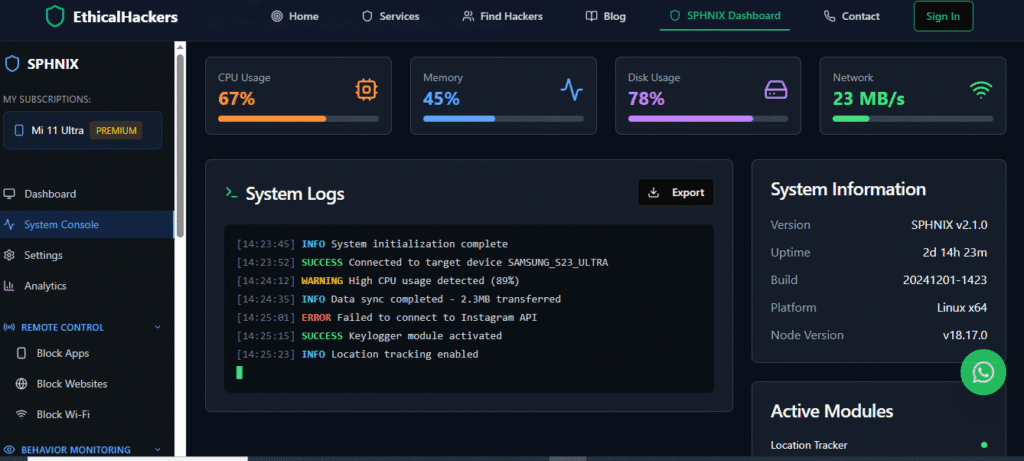
Sphnix offers a robust suite of monitoring tools with a focus on remote accessibility and detailed reporting. It positions itself as a powerful solution for digital oversight.
Key Features:
- Ambient Listening: Remotely activate the phone’s microphone to listen to surroundings.
- Complete Call and Contact Logs: See all incoming/outgoing calls and address book details.
- Media File Access: View photos and videos stored on the device.
- Email Monitoring: Track sent and received emails.
- Remote Control: Options to lock the device or wipe data if lost or stolen.
Best For: Users who want deep device access and advanced features like ambient listening, particularly for parental safety scenarios.
3. Parentaler
As the name suggests, Parentaler is designed with a strong focus on parental controls, offering a user-friendly interface tailored for monitoring children’s digital well-being.

Key Features:
- Screen Time Management: Set schedules to limit phone use during school hours or bedtime.
- App Blocker: Restrict access to specific applications or games.
- SMS and Call Filtering: Block unwanted contacts or specific keywords in messages.
- Panic Alert: Allows the child to send an immediate alert to the parent’s dashboard.
- Browser History & Bookmarks: Monitor internet exploration habits.
Best For: Parents specifically looking for tools to manage screen time, block inappropriate apps, and foster safer internet habits rather than just covert surveillance.
A Step-by-Step Framework for Authorized Monitoring
If you have a legal right to proceed, follow this professional framework:
- Select Your Tool: Choose software (like mSpy, Sphnix, or Parentaler) that matches your specific monitoring goals—comprehensive tracking, parental controls, or employee oversight.
- Secure Physical Access: You will need the target phone for approximately 10-15 minutes to download and install the chosen application. Disable Play Protect (Android) or temporarily adjust installation settings as guided.
- Configure and Hide: Complete the setup, grant the necessary permissions, and then hide or disguise the app icon as per the instructions. The app will now run silently.
- Let the WiFi Do the Work: Once installed, the app will automatically use the phone’s available internet connection—whether it’s your home WiFi, cellular data, or a public hotspot—to send encrypted activity reports to your private online dashboard.
- Access Your Dashboard: Log in to your secure web portal from any browser to view all collected data in an organized format. This is where you truly gain insight, facilitated by the data transmitted through networks like your WiFi.
Enhancing Network Security for Broader Protection
Beyond targeting a specific device, you should secure your WiFi network itself to protect all connected users. This is a positive, proactive step that benefits everyone.
- Change Default Credentials: Always change your router’s default admin username and password.
- Use Strong Encryption: Ensure your WiFi is secured with WPA2 or WPA3 encryption. Avoid outdated WEP.
- Create a Guest Network: Provide a separate WiFi network for visitors. This isolates their traffic from your main network where your personal devices reside.
- Enable Firewalls: Use the built-in firewall on your router and on individual computers.
- Monitor Connected Devices: Regularly check your router’s admin page for unfamiliar devices. This can alert you to unauthorized users on your network.
When Professional Expertise is Necessary
There are situations where a DIY software solution isn’t enough. Perhaps the subject is technically sophisticated and might detect standard apps, or you need evidence gathered in a specific way for legal purposes. In these complex cases, seeking professional help is a prudent choice.
Ethical professional hackers or digital investigators operate with a deep understanding of both technology and the legal landscape. They can handle complex installations, provide expert consultation on what is possible and admissible, and ensure operations remain undetectable. For high-stakes situations, this expertise is invaluable.
<a href=”https://spywizards.com” target=”_blank” style=”display: block; text-align: center; padding: 18px; background-color: #E74C3C; color: white; text-decoration: none; border-radius: 8px; font-weight: bold; margin: 30px auto; font-size: 1.1em; max-width: 350px;”>Hire a Professional Hacker for Complex Cases</a>
Conclusion: Knowledge, Responsibility, and the Right Tools
The question of whether you can hack phones connected to my wifi is nuanced. While you cannot magically decrypt modern app data by controlling the router, your network access can be part of a legal monitoring strategy when combined with authorized software. The true power lies in using dedicated applications like mSpy, Sphnix, or Parentaler, which are designed for this explicit purpose and leverage the device’s internet connection—including your WiFi—to provide you with clear, actionable data.
Always let ethics and the law guide your actions. Use your knowledge to protect your children, secure your business, and strengthen your network’s security for everyone’s benefit. For challenges that require a higher level of skill, do not hesitate to engage professional services to ensure your objectives are met effectively and responsibly.
Frequently Asked Questions (FAQs)
Q: Can I see text messages or social media chats just by monitoring my WiFi?
A: No, you cannot. Modern apps like iMessage, WhatsApp, and Snapchat use end-to-end encryption. This means the messages are scrambled on the sender’s phone and only descrambled on the recipient’s phone. Your WiFi router only sees encrypted data packets, not the readable content.
Q: I saw an unknown device on my WiFi list. Can I monitor it?
A: You should first identify the device. It could be a smart appliance, a guest’s phone, or an intruder. You have the right to block any unauthorized device from your network through your router’s admin settings. However, attempting to actively monitor or hack into that unknown device without any knowledge of who owns it is illegal.
Q: Are these monitoring apps detectable on the target phone?
A: High-quality apps like those mentioned are designed to run in stealth mode. They hide their icon, don’t appear in recent apps, and use minimal battery. However, a very tech-savvy user who checks phone settings for unknown device administrators or profiles might find traces. Their primary defense is discretion, not invisibility.
Leave a Reply