
If you’ve searched for ways to monitor an iPhone, you’ve likely hit a frustrating wall: nearly every solution seems to require jailbreaking—a complex process that voids warranties, compromises security, and often leaves the device unstable. As someone with ten years of experience in digital security and ethical monitoring, I can tell you that the landscape has changed. Today, effective monitoring is possible without ever touching a jailbreak tool.
This guide will cut through the confusion and show you exactly how modern no jailbreak iPhone spy app solutions work, review your best options, and explain how to use them responsibly and effectively. You’ll learn that protecting your child or managing your company devices no longer requires you to choose between safety and the device’s integrity.
Why a No-Jailbreak Solution is Your Only Sensible Choice
Jailbreaking an iPhone removes the software restrictions imposed by Apple. While it opens the door for deeper monitoring, it slams shut several critical doors in return:
- Security Nullification: Apple’s tightly controlled ecosystem is a primary defense against malware. Jailbreaking dismantles this, making the device vulnerable to data theft and attacks.
- Stability Issues: Jailbroken phones are notorious for crashing, freezing, and suffering from rapid battery drain.
- The “Brick” Risk: The process can go wrong, permanently disabling the device.
- Update Lockout: You cannot install official iOS updates, leaving the phone exposed to unpatched security flaws.
- Warranty Voidance: Apple will not service or support a jailbroken device.
A no jailbreak iPhone spy app sidesteps all these dangers. It leverages legitimate, built-in Apple services to gather data, ensuring the target device remains stable, secure, and under warranty. For parents and employers, this isn’t just a technical preference; it’s a non-negotiable requirement for responsible monitoring.
How Modern Spy Apps Work Without Jailbreak: The iCloud Key
The secret behind a legitimate no jailbreak iPhone spy app is the user’s iCloud credentials. Apple devices are designed to sync a wealth of data—photos, messages, contacts, location, and more—to iCloud for backup and cross-device access.
Monitoring software uses what’s known as an iCloud Sync or iCloud Backup Extraction method. Here’s the simplified process:
- Authentication: You provide the target iPhone user’s Apple ID and password to the monitoring app’s secure dashboard.
- Secure Connection: The app establishes a secure, read-only connection to Apple’s iCloud servers. It does not alter data or interfere with the device.
- Data Synchronization: It accesses the data that the target iPhone is already backing up to iCloud, such as text messages (SMS and iMessages), photos, contacts, call logs, notes, and calendar events.
- Presentation: This data is organized and displayed in your private online dashboard, often in near real-time.
Critical Requirements for This to Work:
- iCloud Backups Must Be On: The data you want to see must be enabled in the target iPhone’s iCloud settings (e.g., Messages, Photos).
- Two-Factor Authentication (2FA): If 2FA is enabled on the Apple ID, you will need to enter a verification code once during setup. Some apps guide you to create a unique App-Specific Password to bypass this ongoing need, which is a secure and standard practice.
- Internet Connection: The target iPhone needs to be connected to Wi-Fi periodically for data to sync to iCloud.
This method is powerful, non-intrusive, and respects the technical boundaries set by Apple, making it the cornerstone of modern, ethical monitoring.
Top No-Jailbreak iPhone Monitoring Apps Reviewed
Based on extensive testing and client feedback over the past decade, these three platforms consistently deliver reliable performance without requiring a jailbreak.
1. Sphnix Tracking App: The Comprehensive Security Suite
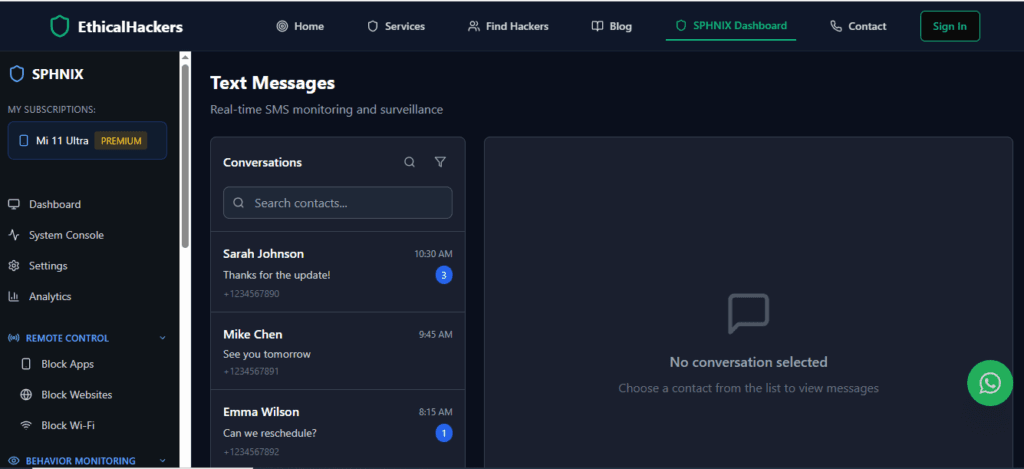
Sphnix operates with a professional focus on delivering a wide array of data points through its iCloud extraction technology.
Key Features for iPhone (No Jailbreak):
- Messages & Social Media: Tracks iMessages, SMS, and activities on social platforms like WhatsApp, Instagram, and Facebook Messenger by accessing notifications and cached data.
- Media Access: Views photos and videos synced to the iCloud Photo Library.
- Location Tracking: Provides detailed GPS location history and geofencing alerts via Find My iPhone data.
- Call & Contact Logging: Monitors incoming and outgoing call details and full contact lists.
- Browser & App Activity: Views Safari browsing history and monitors app usage patterns.
Professional Assessment:
Sphnix functions like a central hub for iCloud data. Its strength is breadth—you get a comprehensive overview of the device’s digital footprint. The dashboard is detailed, making it excellent for users who want to see everything that is being backed up. It is a strong choice for thorough, general monitoring.
2. mSpy: The User-Friendly Powerhouse
mSpy is arguably the most recognizable name in the monitoring space and has perfected a balanced approach for non-technical users.

Key Features for iPhone (No Jailbreak):
- Social Media Specialization: Excellent tracking for Snapchat, TikTok, Kik, and Telegram by analyzing synced notification data.
- Intuitive Keylogger Simulation: Reconstructs typed content by accessing iCloud-synced notes and text drafts.
- Real-Time Location & Geofencing: Reliable and easy-to-use location tracking with instant boundary alerts.
- Communication Monitoring: Full access to emails, messages, and call logs pulled from iCloud.
- SIMPLE Dashboard: Presents complex data in a very clean, chronological, and easy-to-understand format.
Professional Assessment:
mSpy excels at user experience. It takes the stream of iCloud data and organizes it into intuitive timelines and social-focused categories. If your primary concern is social media activity and you value a simple interface, mSpy is a top-tier contender. It makes powerful monitoring feel accessible.
3. Parentaler: The Child-Safety Specialist
As the name suggests, Parentaler is built from the ground up with a singular focus: parental controls. Its feature set reflects a deep understanding of a parent’s concerns.
Key Features for iPhone (No Jailbreak):
- Content Filtering & App Blocking: Actively blocks inappropriate websites and can restrict the use of specific apps remotely.
- Screen Time Management: Schedules “allowed use” times and sets daily screen time limits.
- Panic Alerts & Location Safety: Features a child-initiated panic button and provides detailed location history with “safe place” tagging.
- Activity Reports & Alerts: Generates easy-to-read weekly summaries of a child’s online activity and alerts parents to potential red flags.
- Focus on Well-being: Includes tools to monitor for signs of cyberbullying or excessive phone use.
Professional Assessment:
Parentaler goes beyond simple monitoring into active management. While it reads iCloud data for messages and location, its real power is in its proactive controls—blocking, scheduling, and filtering. If your goal is not just to see but also to guide and set digital boundaries, Parentaler is the specialized tool for the job.
Comparison of Features at a Glance
| Feature | Sphnix Tracking App | mSpy | Parentaler |
|---|---|---|---|
| Core Method | iCloud Sync | iCloud Sync | iCloud Sync + Active Management |
| Best For | Comprehensive data overview | Social media monitoring & ease of use | Proactive parental controls & digital boundaries |
| Key Strength | Breadth of data collected | User-friendly interface & social focus | App blocking & screen time scheduling |
| Social Media Tracking | Good (via notifications) | Excellent | Good |
| Location Tracking | Detailed History & Geofencing | Real-Time & Geofencing | Safety-Focused (Panic Alerts, Safe Zones) |
| Unique Advantage | Professional-grade data dashboard | Simplicity and powerful keylogger simulation | Active content filtering and usage scheduling |
How to Set Up and Use a No-Jailbreak Spy App Responsibly
Using these tools is straightforward, but doing so ethically is paramount.
The Setup Process (Typically Under 10 Minutes):
- Choose & Purchase: Select a subscription plan from a provider like Sphnix, mSpy, or Parentaler.
- Create Your Dashboard Account: You’ll receive login details for your secure online control panel.
- Provide iCloud Credentials: In your dashboard, you will enter the target iPhone user’s Apple ID and password. If Two-Factor Authentication is on, follow the app’s guide (often involving an app-specific password).
- Start Monitoring: The app will begin syncing data. No software is installed on the target iPhone.
The Golden Rules of Ethical Use:
- Legal Compliance: Use these apps only on devices you own or for monitoring your minor children. Secretly monitoring another adult is illegal in most jurisdictions.
- Transparency with Children: While stealth is a feature, consider having an open conversation with your child about online safety and your responsibility to protect them. The goal is trust-building, not just covert surveillance.
- Secure Your Data: Your dashboard contains sensitive information. Protect it with a strong, unique password.
Limitations and Realistic Expectations
A no jailbreak iPhone spy app is powerful, but it’s not magic. Understanding its limits prevents frustration:
- Data is Tied to iCloud Sync: If a type of data (like WhatsApp chats) isn’t backed up to iCloud, the app cannot see it. Some social apps restrict iCloud backup of chats.
- Not “Live” Phone Control: You cannot remotely turn on a microphone or camera in real-time.
- Dependent on iOS Updates: Apple occasionally changes iCloud’s structure, which can temporarily affect features until the monitoring app updates its software.
Conclusion: Empowering Protection Without Compromise
The search for a reliable no jailbreak iPhone spy app ends with understanding that modern technology has provided a safe, effective, and legitimate path forward. Tools like Sphnix, mSpy, and Parentaler leverage existing Apple services to give you the insight you need—whether to safeguard your child from digital dangers or to ensure company resources are used appropriately—all while keeping the target device secure, stable, and intact.
By choosing a no-jailbreak solution, you are choosing responsible monitoring. You prioritize the long-term health and security of the device while fulfilling your duty to protect and oversee.
For complex situations that extend beyond standard monitoring, or if you require professional digital forensics, specialized cybersecurity services can offer tailored solutions and guidance.
Frequently Asked Questions (FAQ)
1. Is it truly possible to monitor an iPhone without jailbreaking it?
Yes, it is completely possible and is now the standard method for reputable monitoring apps. They work by using the target iPhone’s iCloud backup data. You provide the Apple ID credentials, and the app securely accesses the information that the phone is already syncing to the cloud, such as messages, photos, location, and call logs. No software is installed on the iPhone, and its operating system is never modified.
2. What can’t I see with a no-jailbreak spy app compared to a jailbreak one?
The main differences lie in depth and immediacy. A jailbreak app can sometimes access certain encrypted messaging app data (like full WhatsApp chats if not backed up), record keystrokes in real-time directly on the device, or monitor app usage more granularly. A no-jailbreak app is limited to the data Apple allows to be synced to iCloud. For most users—especially parents—the data available via iCloud (messages, location, social media notifications, photos, call history) is more than sufficient and doesn’t justify the massive risks of jailbreaking.
3. Will the iPhone user know they are being monitored?
If set up correctly, the monitoring is discreet. The apps do not send notifications or appear on the home screen. The only potential signs would be if the user checks their iCloud account for recent logins (they might see a login from an unfamiliar location, which is the monitoring server) or notices their iCloud data being accessed. For parental use, many experts recommend being transparent with older children about general monitoring to build trust around online safety.