
For over a decade, I’ve worked in digital security, and one of the most frequent questions I encounter is about gaining remote access to a smartphone. The idea of how to wirelessly hack a phone often conjures images of Hollywood-style breaches, but the reality is both more nuanced and more accessible for legitimate purposes. Whether you’re a concerned parent, an employer managing company devices, or an individual testing your own security, understanding the landscape is crucial. This guide will cut through the misinformation, explain the actual technology behind remote monitoring, and review the top-tier applications that make it possible within legal and ethical boundaries. Forget shady forums and impossible promises; we’re focusing on proven, installable software that provides transparent access to device data.
Updated February 2026
It’s vital to state this unequivocally: You should only monitor a device you own or have explicit, legal permission to monitor. Unauthorized access is a serious crime. The information here is for educational and legitimate use cases, such as parental control or protecting your business assets.
How Modern Monitoring Software Actually Works
The phrase “wirelessly hack” is misleading. True wireless access—where no physical interaction is needed—is extremely rare and typically exploits unpatched, zero-day vulnerabilities in operating systems. These methods are closely guarded, illegal to use on others, and not available to the public.
Instead, what most people seek is remote monitoring software. This requires a one-time, physical installation onto the target phone. After this initial setup, all data access and management happen wirelessly and remotely. The software runs silently in the background, collecting data like call logs, messages, GPS location, and app activity, then uploading it to a secure online dashboard you can access from any web browser. This is the legitimate, practical approach to understanding how to wirelessly hack a phone for authorized purposes.
Critical Pre-Installation: Gaining Physical Access
There is no way around this first step for the vast majority of reliable tools. You need the target phone in your hand for about 5-10 minutes. This involves:
- Disabling Security: Temporarily turning off app verification (like Google Play Protect) and allowing installations from unknown sources.
- Downloading and Installing: Downloading the monitoring app’s file (APK for Android, using a specific process for iOS) and installing it.
- Granting Permissions: Enabling a critical list of permissions for the app to access contacts, location, storage, etc.
- Hiding the App: Most apps offer a stealth mode or can be disguised under a generic name.
Once this setup is complete, the phone can be returned. The app will delete its icon and begin transmitting data to your private online control panel. From this point forward, your monitoring is completely wireless.
Reviewing the Top-Tier Monitoring Applications
After testing countless services over the years, a few have consistently proven reliable, feature-rich, and stable. Here is a breakdown of the current leading options.
1. SPHINX Tracking App
SPHINX has earned a reputation as a powerful and versatile tool, particularly favored for its robust Android tracking capabilities. Its dashboard is comprehensive, offering deep insights into device usage.
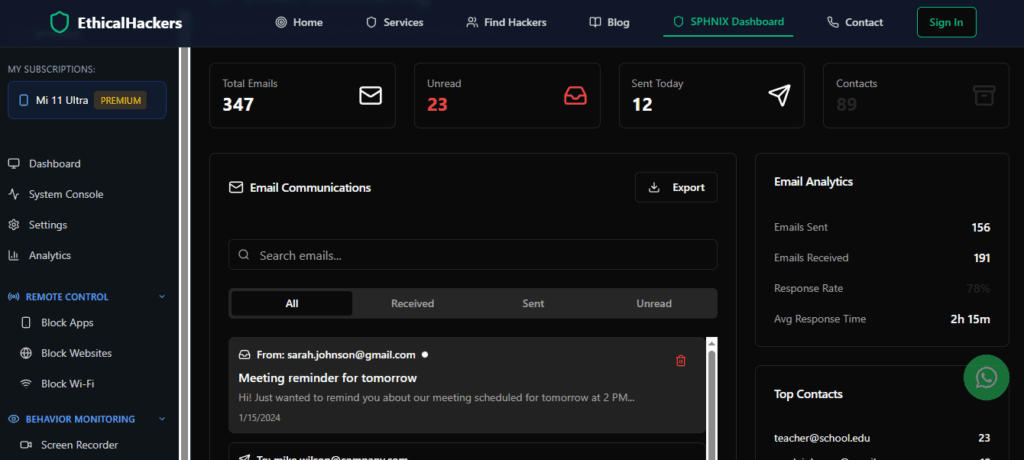
Key Features:
- Social Media Monitoring: Tracks messages and calls on WhatsApp, Snapchat, Facebook, Instagram, and more.
- Ambient Recording: Can remotely activate the phone’s microphone to listen to surroundings.
- Keylogger: Captures every keystroke made on the device, revealing search terms and login credentials.
- GPS & Geofencing: Provides real-time location history and allows you to set up alert zones.
- Stealth Mode: Operates with complete invisibility after installation.
For those seeking a powerful all-in-one solution, SPHINX is a top contender.
2. mSpy
mSpy is one of the most established names in the industry, known for its user-friendly interface and reliable performance. It’s an excellent choice for both beginners and experienced users, especially for parental control.

Key Features:
- App Blocking & Alerts: Remotely block any app and receive alerts when specific apps are used.
- Comprehensive Call & SMS Tracking: Views full call logs and text messages, even deleted ones.
- Wi-Fi Network Tracking: See which networks the device connects to.
- Browser History Monitoring: Tracks all visited websites and bookmarks.
- 24/7 Support: Offers reliable customer service, which is a rarity.
mSpy strikes a great balance between powerful features and ease of use.
3. Parentaler
Parentaler is designed with a clear focus on keeping children safe online. Its interface is intuitive for parents and bundles essential monitoring features without overwhelming complexity.

Key Features:
- Location Tracking & SOS Panic Button: Real-time location and a child-activated alert button for emergencies.
- Screen Time Management: Set daily usage limits and specific device bedtimes.
- App Activity Reports: See how much time is spent on each application.
- Contact & Call Monitoring: Review contacts and incoming/outgoing calls.
- Affordable Pricing: Often positioned as a cost-effective solution for core monitoring needs.
If your primary goal is straightforward parental oversight, Parentaler delivers.
4. Eyezy
Eyezy is a newer entrant that has quickly gained attention for its innovative features and clean dashboard design. It emphasizes powerful social media and data insight tools.
Key Features:
- Social Spotlight: A dedicated module that deeply scans over 30+ social apps for messages and media.
- Files Finder: Scans the device for specific files, photos, or videos.
- Phone Analyzer: Provides a breakdown of the top contacts, most used apps, and frequented locations.
- Invisible Shield: Ensures the app remains completely hidden after setup.
- Keyword Alerts: Get notifications when specific words are typed or appear in messages.
Eyezy is ideal for users who want detailed analytics and deep social media insight.
Discover Eyezy’s unique feature set:
Visit Eyezy Official Site
Choosing the Right Tool for Your Needs
Your choice depends on your specific goal:
- For Comprehensive, Power-User Monitoring: SPHINX or Eyezy offer the most extensive feature sets.
- For Balanced Ease-of-Use and Reliability: mSpy is the industry standard for a reason.
- For Straightforward Parental Controls: Parentaler provides a simple, focused toolkit.
All these apps follow the same core principle: one-time physical installation followed by continuous, remote wireless access. This is the true, practical answer to how to wirelessly hack a phone in a legal context.
Protecting Yourself from Unwanted Monitoring
Understanding this technology also helps you defend against it. To protect your own phone:
- Keep Your Phone Physical: Never leave your device unattended and unlocked.
- Update Religiously: Install OS and app updates immediately; they patch security holes.
- Review App Permissions: Periodically check which apps have access to your location, microphone, and messages.
- Monitor Battery & Data Usage: Spy apps can cause unusual battery drain or data spikes.
- Use Strong, Unique Passcodes: A strong password or biometric lock is your first line of defense.
Conclusion: Empowerment Through Understanding
The journey to understand how to wirelessly hack a phone is really about understanding modern monitoring technology. It’s a powerful tool for safety, security, and peace of mind when used responsibly and legally. The applications listed—SPHINX, mSpy, Parentaler, and Eyezy—represent the most effective and reliable methods available to the public today.
However, for situations that fall outside the capabilities of installable software—such as needing to investigate a potential breach without physical access, or requiring highly specialized digital forensics—the expertise of a professional becomes essential.
If you are facing a complex security challenge or require professional investigative services, do not attempt risky or illegal methods. Consult with an expert team who operates within strict legal frameworks.
Frequently Asked Questions (FAQs)
Q1: Is it truly possible to hack a phone wirelessly without any physical access?
A: In practical terms for everyday users, no. Publicly available, reliable tools like SPHINX, mSpy, or Eyezy require a one-time physical installation. Truly “no-touch” exploits exist but are highly classified, illegal to deploy on others, and not sold commercially. Any service claiming to do this is almost certainly a scam.
Q2: Can I install these apps on an iPhone remotely?
A: iOS is more restrictive. To monitor an iPhone without jailbreaking, you typically need the target’s iCloud credentials (username and password) and must disable two-factor authentication, which is a major red flag for the user. Installation with full features (like on Android) still requires physical access and a more complex process. Always check the specific requirements for iOS on the app provider’s website.
Q3: Will the phone user know they are being monitored?
A: Not if the app is installed and configured correctly. All the high-quality apps listed (SPHINX, mSpy, Parentaler, Eyezy) are designed to run in stealth mode. They hide their icon, do not appear in the app list, and operate silently in the background. Performance issues like battery drain have been minimized by these top-tier providers.