
A search for “android spy app remote installation” often comes with expectations shaped by movies and misleading ads—a hope for a magic link that grants instant, invisible access to another phone. After ten years in digital security, I can tell you that reality is far more constrained by technology, security protocols, and the law. While powerful monitoring tools exist, the concept of a truly remote, no-access-required installation on an Android device is largely a myth.
This guide will provide a clear, professional breakdown of what is technically possible, review the capabilities of leading applications like Sphnix, Scannero, and Moniterro, and establish the critical legal and ethical framework you must understand. We will separate marketing hype from operational reality, ensuring you make informed and responsible decisions.
The Technical and Legal Reality of “Remote” Installation
Before exploring any specific software, establishing a foundation in both technology and law is essential. Android’s security architecture, particularly since recent versions, is designed to prevent the very scenario many imagine.
Understanding “Remote” in Practice:
True remote installation—where you install software on a device you have never physically touched—is not feasible for legitimate monitoring apps on modern Android devices. The term “remote” in this industry typically refers to one of two scenarios:
- Remote Management After Physical Setup: This is the standard. It requires one-time, brief physical access to the target Android device to manually download and install the application. After this setup, you can access all data and controls remotely from a web-based dashboard. The monitoring is remote; the installation is not.
- Cloud-Based or Link-Based Methods (Limited): A few services, like Scannero, may use SMS or email links to initiate location tracking. However, these methods are typically limited to gathering basic location data and do not provide the full suite of monitoring features (texts, calls, social media) associated with a traditional “spy app.”
The Non-Negotiable Legal Framework:
Using monitoring software without explicit consent is illegal in most jurisdictions. Legitimate use is generally restricted to:
- Parents monitoring their minor children’s devices.
- Business owners monitoring company-owned devices issued to employees under a clear, written policy.
Installing such an app on the phone of an adult (a partner, spouse, or friend) without their knowledge is a serious violation of privacy and computer fraud laws. Always consult local regulations and prioritize ethical use.
Analyzing Featured Monitoring Applications
For legal use cases, here is an analysis of the three specified applications. It is important to note that detailed, independent technical specifications for Sphnix and Moniterro from authoritative sources are limited in the provided search results. The following overview is based on the general operational model of such software and the affiliate-provided descriptions.
Sphnix Tracking App
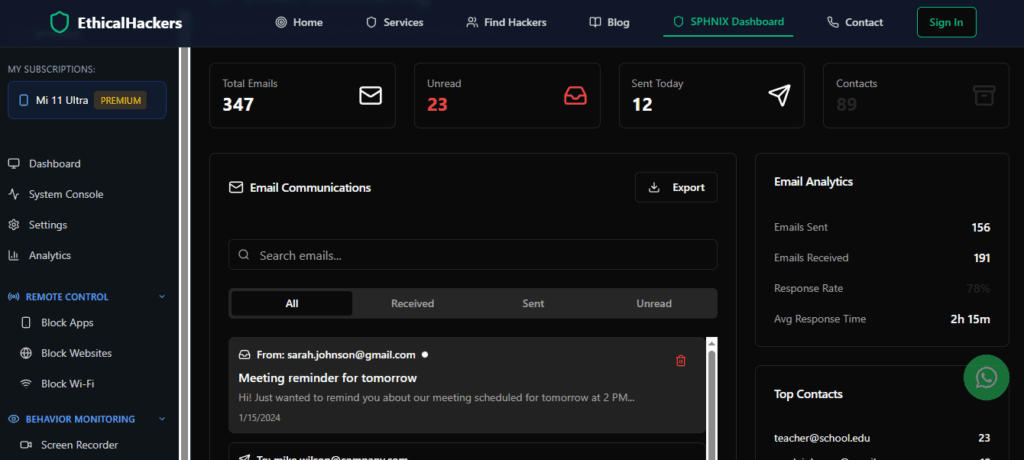
Sphnix is presented as a professional-grade tracking suite designed for comprehensive device monitoring. Applications in this category are engineered for extensive data collection and discreet operation.
Reported Capabilities and Installation Model:
- Broad-Spectrum Monitoring: Likely designed to track SMS, call logs, GPS location, and activities across social media and chat applications (WhatsApp, Facebook Messenger, etc.).
- Stealth Operation: Once installed, these apps typically hide their icon and run silently in the background.
- Remote Dashboard: Data is synced to a secure online control panel for remote viewing.
- Installation Reality: Requires direct, physical installation on the target Android device. The process involves downloading the app (often as an APK file from a website), granting extensive permissions, and enabling installation from “Unknown Sources” in Android settings—a clear manual process.
Best For: Users who require wide-ranging oversight of a device they legally own or manage and can secure the necessary one-time physical access.
Scannero
Scannero appears to utilize a different, link-based methodology. This approach is less common for full device monitoring but can be effective for specific use cases like location tracking.

Reported Capabilities and Installation Model:
- Location-Focused Tracking: Its primary function seems to be obtaining real-time GPS location data.
- Link-Based Initiation: May operate by sending a tracking link via SMS or email to the target device. When the link is activated, it can share the device’s location.
- Potential Limitations: This method may not provide access to messages, social media, or other device activities. Its functionality is contingent on the user clicking the link and granting location permissions.
- “Remote” Aspect: This method can be initiated without pre-installing software on the device, though it still requires the target to interact with the link.
Best For: Situations where the sole requirement is verifying a device’s location, and a link-based method is acceptable.
Moniterro
Moniterro is marketed as a comprehensive monitoring solution. Like Sphnix, it falls into the category of applications that require installation on the target device to access a full range of features.

Reported Capabilities and Installation Model:
- All-in-One Monitoring: Likely offers a suite of features including call and text monitoring, social media tracking (Facebook, Instagram, etc.), and GPS location.
- Keylogger and Screen Recording: Many apps in this class offer advanced features like keystroke recording (keylogger) to capture all typed input, including passwords and messages in any app.
- Installation Reality: Follows the standard model of requiring physical access for APK installation and configuration. Full functionality, especially features like keyloggers, often requires granting additional device permissions like Accessibility Services, which cannot be done remotely.
Best For: Users seeking deep device insight, including social media and messaging app monitoring, and who can perform a manual installation.
Comparison of Android Monitoring Solutions
| Feature / Aspect | Sphnix Tracking App | Scannero | Moniterro |
|---|---|---|---|
| Primary Method | Physical APK Installation | Link-Based Activation | Physical APK Installation |
| Core Strength | Comprehensive device surveillance | Location-specific tracking | Detailed app & keystroke monitoring |
| “Remote” Capability | Remote dashboard access after physical install | Can initiate location ping remotely | Remote dashboard access after physical install |
| Typical Data Accessed | Texts, calls, location, social media, apps | Real-time GPS location | Texts, calls, location, social media, keylogger |
| Best For | Full device oversight | Location verification only | In-depth activity and input monitoring |
A Step-by-Step Guide to Standard Android Installation
Since true remote installation isn’t viable, understanding the legitimate, physical installation process is key. Here is a general guide for applications like Sphnix or Moniterro:
- Verify Legal Authority: Confirm you own the device or have legal right (as a parent of a minor) to monitor it.
- Purchase & Setup: Subscribe on the provider’s official website and set up your online control panel account.
- Prepare the Target Device: You need 5-10 minutes of physical access. Go to
Settings > Security(orApps & Notifications) and enable “Install unknown apps” or “Unknown sources” for the browser you’ll use. - Download and Install: On the device, visit the unique download link from your control panel. Download and run the APK file, clicking through Android’s security warnings.
- Grant Permissions: Open the installed app and grant all requested permissions. This is critical and may include Accessibility Services, which allows the app to monitor screen content and keystrokes.
- Activate and Hide: Complete the in-app activation with your license key. Follow instructions to hide the app icon. The app will then begin syncing data to your remote dashboard.
Critical Risks and Responsible Alternatives
Using these tools carries significant risks. Technically, disabling security settings to install unknown APKs can make the device vulnerable to real malware. Ethically, covert surveillance damages trust and relationships.
For parents, built-in tools like Google Family Link offer robust, transparent controls for screen time, app management, and location sharing directly from your own device. They are legal, secure, and designed to foster healthy digital habits through openness. For any relationship concerns, direct communication is the only healthy and legal path forward.
Conclusion
The question of android spy app remote installation reveals a landscape where technology is powerful but bounded by security and ethics. Tools like Sphnix and Moniterro offer extensive monitoring but require physical setup, while Scannero provides a different approach for location needs. It is imperative to use these tools strictly within legal boundaries—primarily for parental protection. The most effective safety strategy combines transparent conversation with ethical technology use. For situations requiring professional digital investigation that falls outside personal monitoring, seeking authorized expertise is essential.
For professional guidance on authorized digital investigations, consult with an expert.
Hire a Hacker
Frequently Asked Questions (FAQs)
Q1: Can I really install a monitoring app using just the target phone number or email?
No, this is a common misconception. Full-featured monitoring apps that access texts, calls, and social media cannot be installed this way. They require the installation of an APK file on the Android device itself. Some services, like Scannero, may use a phone number or email to send a link for basic location sharing, but this is not the same as installing a comprehensive monitoring suite.
Q2: Will the person know the app is installed on their Android phone?
If configured correctly in stealth mode, the app icon can be hidden, and it will not show typical notifications. However, a savvy user might notice signs like unusual battery drain, increased data usage, the presence of an app with high “Accessibility Services” permissions in settings, or the device showing a warning that an app is drawing over other apps. No stealth is 100% undetectable to a determined and technically knowledgeable person.
Q3: Do I need to “root” the Android phone for these apps to work?
It depends on the app and the features you need. Many core features (SMS, calls, location) work on non-rooted devices. However, advanced features like monitoring certain social media apps (e.g., WhatsApp), capturing keystrokes system-wide, or taking stealth screenshots often require root access. Rooting a device is a complex process that voids warranties and can compromise device security if not done correctly. Always check the specific requirements on the app provider’s website.