
The desire to log into someone else’s Gmail account is a sensitive topic that crosses the paths of concerned parents, suspicious partners, and vigilant employers. In over a decade of cybersecurity work, I’ve seen firsthand how this request often stems from worry, fear, or a genuine need for protection. However, the technical path to accessing another person’s email is paved with significant legal, ethical, and security pitfalls.
This article will provide a clear-eyed view of the mechanisms that make such access possible, the severe risks involved, and the only scenarios where this action is justified. More importantly, I will guide you toward ethical and legal monitoring solutions that can provide peace of mind without crossing dangerous lines.
How Access to Gmail Accounts is Technically Achieved
Understanding the methods is the first step in grasping the full implications. There is no magic button to access a private Gmail; instead, access typically occurs through a few technical avenues, often involving the target’s own devices.
The most common method leveraged by commercial monitoring software is indirect access via a compromised device. Apps installed on a target smartphone do not “hack” Gmail’s servers. Instead, they monitor the activity on the device itself. If the Gmail app is logged in or the user visits Gmail in a browser, the monitoring software can record this activity. This can include capturing login credentials via a keylogger, syncing data from the app, or taking screenshots of the inbox .
Another method is exploiting account recovery flaws. This involves using personal information (answers to security questions, access to a recovery phone number or email) to trigger Google’s account recovery process and reset the password. This method relies on social engineering and the target’s poor security hygiene.
Finally, there is direct credential theft. This involves stealing a password through phishing, finding it written down, or extracting it from a password manager on a compromised device. It’s the most straightforward but also the most easily detectable method, as the legitimate user will be locked out.
The Critical Legal and Ethical Landscape
Before exploring any tools or methods, you must understand the legal firewall that surrounds personal communications. Unauthorized access to someone else’s email account is a federal crime in many countries, including the United States, where it violates laws such as the Computer Fraud and Abuse Act (CFAA).
Legality hinges entirely on consent and ownership:
- For Parents: You generally have the legal right to monitor the online activities of your minor children on devices you own. Transparency is a best practice, but the law often sides with parental responsibility for safety.
- For Employers: You may monitor activity on company-owned devices and email accounts issued to employees. This must be clearly stated in a written company policy that employees acknowledge. Monitoring personal Gmail accounts on a company device is a legal gray area and often prohibited.
- For Anyone Else: Secretly accessing the Gmail account of a spouse, partner, friend, or any other adult without their explicit permission is illegal. It is a serious invasion of privacy that can result in criminal charges and civil lawsuits.
The ethical line is just as important. Covert surveillance erodes trust and damages relationships irreparably. The intent should always be protection, not control or espionage.
Analysis of Monitoring Solutions with Email Access
Several monitoring solutions market the ability to track email communications. It’s vital to understand they provide this access through the device-level methods described earlier, not by magically bypassing Google’s security.
1. Sphnix Tracking App
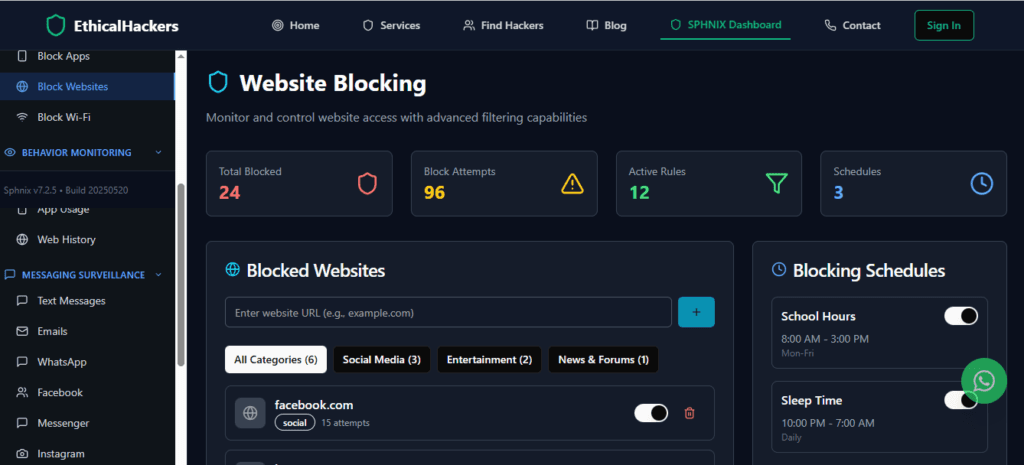
Sphnix is presented as a comprehensive monitoring suite. Reviews highlight its capability to track calls and messages in real-time from a discreet dashboard .
Reported Key Features:
- Communication Monitoring: Tracks calls, SMS, and may extend to app-based communications .
- Stealth Operation: Designed to run invisibly on the target device .
- Data Synchronization: Captured data is uploaded to a secure online dashboard for remote access .
Professional Assessment:
While specific mention of Gmail monitoring is not detailed in the provided search results, apps in this category often include email tracking as part of broader communication surveillance. Potential users should directly verify this feature with the vendor and be acutely aware of the serious security risks associated with all such apps, including a history of data breaches in the industry .
2. mSpy
mSpy is one of the most well-known monitoring apps and explicitly advertises Gmail monitoring as a feature, stating users can “access their Gmail account” through the control panel .
Reported Key Features:
- Gmail Connection: Specifically mentions the ability to connect and monitor a Gmail account .
- Keylogger: Records keystrokes, which could capture email passwords and the content of emails being typed .
- Extensive Social Media Coverage: Monitors a vast array of messaging apps, call logs, and browser history .
Professional Consideration:
mSpy’s direct mention of Gmail monitoring makes it a relevant example. However, it is crucial to note that security analyses have repeatedly flagged companies in this sector, including mSpy, for serious data breaches and vulnerabilities, potentially exposing the monitor’s data and the target’s information . Furthermore, such powerful surveillance tools are ethically fraught and legally dangerous if misused.
3. Parentaler
Parentaler is framed as a parental control solution, focusing on child safety rather than covert spying. An independent review notes it offers monitoring of texts, calls, and social media .

Reported Key Features:
- Communication & Social Monitoring: Oversight of calls, SMS, and social media platforms .
- Location and Geofencing: Real-time GPS tracking with alert zones .
- Content Filtering: Ability to block inappropriate websites and apps .
Professional Assessment:
Parentaler’s positioning is more aligned with responsible parenting. While the provided review does not specify Gmail monitoring, its focus on holistic activity oversight suggests it may track email access as part of a broader digital safety report. Its transparent parental control angle may present a more ethically palatable option for monitoring minors, though all legal considerations still apply.
Comparative Overview
Protecting Yourself: Signs Your Gmail May Be Compromised
Knowing how access occurs helps you defend against it. If you’re worried your account is being monitored, look for these signs of spyware on your device:
- Unusual Device Behavior: Rapid battery drain, overheating, or poor performance can indicate hidden software running .
- Suspicious Account Activity: Check your Gmail’s “Last account activity” page for logins from unfamiliar locations or devices.
- Unexplained Data Usage: Spyware uses your data to transmit information, leading to unexpected usage spikes .
- Unknown Apps or Profiles: On iPhones, check for unrecognized Configuration Profiles in Settings > General > VPN & Device Management. On all devices, scrutinize your installed app list.
If you suspect compromise: Immediately change your Gmail password using a trusted, clean device. Enable two-factor authentication (2FA). Run a security scan on your device, and consider a factory reset after backing up essential data .
Ethical Alternatives and Responsible Actions
Instead of seeking to secretly log into someone else’s Gmail account, consider these legal and constructive alternatives:
- Open Communication: For relationship concerns, have a direct, honest conversation. For parental worries, establish guidelines and use monitoring as a transparent tool for safety, not secrecy.
- Use Built-in Parental Controls: For child safety, platforms like Google Family Link and Apple Screen Time offer legitimate, consensual oversight of app use and screen time without needing to invade private emails.
- Professional Assistance: In extreme cases, such as suspected criminal activity or threats to a child’s safety, take your concerns to the proper authorities (law enforcement) or a licensed professional (therapist, private investigator operating within the law).
Conclusion
The question of how to log into someone else’s Gmail account ultimately leads to a crossroads between technical possibility and personal integrity. While monitoring software exists and can provide deep access to a device’s activity, its use is a minefield of legal peril, ethical decay, and security risk—not just for the target, but for the user as well, given the industry’s poor security record . Responsible digital oversight is built on a foundation of legality, consent where possible, and the rightful intent to protect. If your goal is safety, leverage transparent tools and open dialogue. If your goal is control or suspicion, no amount of technical access will resolve the underlying issue.
For situations requiring professional digital investigation within strict legal boundaries, consulting with a licensed cybersecurity expert is the only appropriate path.
Frequently Asked Questions (FAQ)
1. Is it illegal to use monitoring software to access someone’s Gmail?
In most jurisdictions, it is illegal to use monitoring software to access another adult’s private communications, including email, without their explicit knowledge and consent. Laws such as the Computer Fraud and Abuse Act in the U.S. criminalize unauthorized access. The primary legal exceptions typically involve parents monitoring their minor children and employers monitoring company-owned devices with a published policy.
2. Can someone tell if I’ve logged into their Gmail using a monitoring app?
Possibly. While the app itself may be hidden, the user might notice secondary signs like decreased device battery life or performance . More directly, Google’s security features may send an alert to the account holder if a new device or browser logs in, especially if two-factor authentication is enabled. The “Last account activity” page in Gmail also shows access history.
3. Doesn’t Gmail’s security prevent this kind of access?
Gmail’s security (like strong passwords and two-factor authentication) is highly effective against remote hackers. However, monitoring apps bypass these protections by operating locally on a device where the user is already logged in. They exploit the device’s trust, not a flaw in Google’s security. The best defense is physical device security, strong unique passcodes, and vigilance against unauthorized app installations .