
How to see everything someone does on Facebook? That question, whether driven by parental concern or professional responsibility, is more common than you think. Facebook isn’t just for sharing memes; it’s a primary channel for private messaging, group interactions, and social connections. As someone with a decade of experience in digital monitoring and cybersecurity, I can tell you that gaining insight into Facebook activity is a technical possibility, but it’s surrounded by significant legal and ethical considerations.

This guide will provide a clear, professional breakdown of legitimate methods, review the specific tools that can help, and outline the crucial framework you must follow. We will explore solutions like mSpy, Parentaler, and Sphnix, focusing on their features for those who have a legal right to know.
The Critical Foundation: Legality and Ethical Use
Before discussing any technical tool, you must establish a legal and ethical foundation. Monitoring an adult’s private social media activity without their explicit consent is illegal in most jurisdictions, potentially violating wiretapping, computer fraud, and stalking laws.
The legitimate use of Facebook monitoring tools is typically restricted to two clear scenarios:
- Parents monitoring the Facebook activity of their minor children. Parents have both a legal right and a responsibility to oversee their children’s online interactions to protect them from cyberbullying, predators, and inappropriate content.
- Businesses monitoring company-owned devices. Employers may monitor activity on devices they provide to employees, but this must be done under a clear, written policy that employees acknowledge.
Using tools like mSpy or Sphnix to secretly monitor a partner, spouse, or friend’s Facebook is not only a profound breach of trust but also a criminal act in many areas. This guide is for informational purposes and focuses on legal, responsible application.
How Facebook Monitoring Technology Actually Works
Applications designed for this purpose don’t magically “hack” Facebook’s servers. Instead, they are installed on the target smartphone or tablet. Once installed, they operate in the background to capture and relay data.
The general technical process involves:
- Installation: The app must be downloaded and installed directly on the target device. This almost always requires one-time physical access.
- Data Capture: The application monitors the device’s activity, logging keystrokes, screen interactions, and data from the Facebook app itself.
- Data Transmission: The collected information is encrypted and sent to secure servers operated by the monitoring service.
- Remote Dashboard: The person who installed the app (e.g., a parent) can then log into a private, online control panel from any web browser to view the collected Facebook activity, often in near real-time.
Crucially, for iOS devices, many apps like mSpy can use iCloud credentials to sync certain data without a full installation, though this may limit functionality.
In-Depth Review of Featured Monitoring Applications
Here is a detailed analysis of three applications relevant to monitoring Facebook and broader device activity.
mSpy: The Extensive Monitoring Suite
mSpy is one of the most established names in the monitoring software industry, known for its wide array of features and compatibility. According to its official site, it provides “remote access to all data and activities on any phone” and operates in a 100% invisible mode with no app icon displayed.

Core Features for Facebook Monitoring:
- Social Media Tracking: mSpy specifically monitors Facebook activity, along with other platforms like WhatsApp, Snapchat, and Instagram. It can track messages, shared media, and timestamps.
- Keylogger Function: This powerful feature records every keystroke made on the device. This means it can capture Facebook login credentials, search terms, and typed messages even before they are sent.
- GPS Location Tracking: Provides real-time location and location history, adding context to social activity.
- Stealth Operation: The app is designed to run hidden in the background after installation.
Best For: Users who need a comprehensive, all-in-one monitoring solution with proven reliability and extensive social media coverage, including Facebook.
Parentaler: The Parent-Focused Safety App
As the name indicates, Parentaler is tailored specifically for parental use. It is marketed as a “top notch parental control app for full phone monitoring” that helps parents keep an eye on their child’s online world with full confidentiality.

Core Features for Facebook Monitoring:
- Social Media & Messenger Oversight: Parentaler allows you to “keep an eye on their conversations on popular messengers and social media with just a single click,” which includes Facebook.
- Content Filtering & App Blocking: A core function is the ability to “restrict their browser & apps activities,” allowing parents to block access to Facebook or other specific apps if necessary.
- Location Safety Features: Includes GPS tracking to see a child’s whereabouts.
- Call and Text Monitoring: Accesses phone logs and SMS, providing a full picture of communications.
Best For: Parents whose primary goal is child safety and digital wellbeing, preferring an app built with transparent parental controls rather than pure stealth surveillance.
Sphnix Tracking App
Sphnix is presented as a professional tracking and monitoring solution. While specific details from independent tests are limited, platforms in this category typically offer a suite of surveillance features.
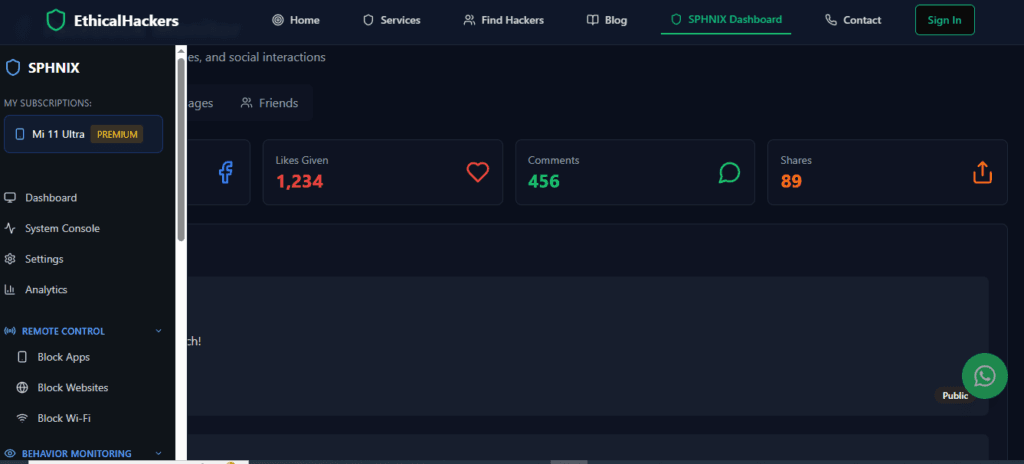
Reported Capabilities:
- Social Media Monitoring: As a comprehensive tracking app, Sphnix is engineered to monitor communications on social platforms, which would include Facebook messages and activity.
- Stealth and Remote Access: Designed for discreet operation, providing remote access to logged data via a secure dashboard.
- Extended Device Surveillance: Likely includes standard features like location tracking, call logging, and access to other app data.
Best For: Users seeking a dedicated monitoring tool for a device they legally manage, where extensive oversight is required.
Comparison of Key Monitoring Applications
| Feature / Focus | mSpy | Parentaler | Sphnix Tracking App |
|---|---|---|---|
| Primary Strength | Broad feature set & social media tracking | Child safety & content filtering | Covert monitoring suite |
| Facebook Monitoring | Yes, with keylogger support | Yes, with blocking capabilities | Yes (assumed based on category) |
| Best For | Comprehensive oversight | Parental controls | Discreet surveillance |
| Stealth Mode | Yes, 100% invisible | Configurable (can be visible) | Yes |
A Responsible Implementation Guide
If you have a legal right to monitor, follow these steps:
- Verify Your Legal Right: Confirm you are a parent monitoring a minor or an employer with a compliant policy.
- Select the Appropriate Tool: Use the comparison above. Choose mSpy for maximum features, Parentaler for child-focused safety, or Sphnix for general tracking.
- Purchase & Setup: Subscribe on the official website and prepare for installation.
- Installation: Secure brief physical access to the target device. Precisely follow the provider’s installation guide, which will involve downloading the app and granting permissions.
- Monitor via Dashboard: Remotely access your secure online control panel to review Facebook activity and other logged data.
The Risks and Ethical Alternatives
Using these tools carries risks. Technically, installation may require disabling device security features. Ethically, covert monitoring of an adult is damaging and illegal.
For parents, having open conversations about online safety is more effective than pure surveillance. For relationship concerns, direct communication or professional counseling is the only healthy path. If you are an employer, transparency with a clear electronic communications policy is mandatory.
Conclusion
Understanding how to see everything someone does on facebook involves navigating a space where technology, law, and ethics intersect. For legal parental control, tools like Parentaler offer safety-focused oversight. For more comprehensive monitoring needs, mSpy provides extensive features. It is imperative that these powerful tools are used only within strict legal boundaries. If your situation involves complex digital investigation needs that require professional expertise, seeking specialized help is the correct course.
For professional guidance on complex digital investigations, consult with an expert.
Hire a Hacker
Frequently Asked Questions (FAQs)
Q1: Can I monitor Facebook Messenger messages with these apps?
Yes, comprehensive monitoring apps like mSpy are specifically designed to track and log conversations on Facebook Messenger, along with many other chat applications. They capture sent and received messages, timestamps, and sometimes shared files.
Q2: Will the person get a notification that I’m monitoring their Facebook?
High-quality apps like mSpy are engineered for stealth operation, meaning they run invisibly in the background without sending notifications to the device user. However, a technically savvy person might notice unusual battery drain or data usage.
Q3: Do I need to jailbreak or root the phone to monitor Facebook?
It depends on the device and the app. For full functionality on iOS (like monitoring Facebook Messenger), some apps may require jailbreaking. For Android, rooting might be needed for advanced features like keylogging. Always check the specific requirements on the provider’s official website for your target device’s operating system. Apps like mSpy offer solutions for both jailbroken/rooted and non-jailbroken/rooted devices, with varying feature sets.