
The idea of secretly installing monitoring software on someone’s phone from miles away taps into a powerful, almost universal, curiosity. For over a decade, I have worked in digital forensics and ethical monitoring, and “how to install spy software on cell phone remotely” remains one of the most searched-for yet misunderstood questions online. Many believe it’s as simple as entering a phone number and clicking a button.
The reality, governed by technology, security, and crucially, the law, is far more complex. This guide will cut through the myths, explain the actual methods that exist, and provide a clear-eyed look at the tools available, including mSpy, Sphnix, and Parentaler. More importantly, it will establish the critical legal and ethical framework you must understand before proceeding.
The Non-Negotiable Foundation: Legality and Consent
Before discussing a single technical step, you must establish the legal foundation. Using monitoring software without explicit consent is illegal in most jurisdictions and can result in severe criminal and civil penalties, including charges for computer fraud, stalking, and invasion of privacy.
Legitimate use generally falls into two strict categories:
- Parents monitoring their minor children’s devices. You have a legal responsibility for their safety, and tools can help protect them from online threats. However, even here, transparency about digital safety is increasingly seen as a healthier approach than covert surveillance.
- Businesses monitoring company-owned devices issued to employees. This must be done with a clear, written policy that employees acknowledge, stating that company property and communications are subject to monitoring.
Installing any tracking software on the phone of another adult—a spouse, partner, or friend—without their explicit, informed knowledge and consent is almost universally illegal. The only path forward is to ensure you have undisputed legal authority over the device or its user. If you are unsure, consult with a legal professional first.
Debunking the “Remote” Myth: What “Remote Installation” Really Means
The term “remote installation” is often misinterpreted. With modern smartphone security, you cannot typically install complex monitoring software on a target device without any form of physical access. There is no magic link you can send that invisibly installs a full-featured tracker.
What vendors actually mean by “remote” usually refers to one of two scenarios:
- Remote Management After Physical Setup: This is the most common method. You need one-time, brief physical access to the target device (approximately 5-10 minutes) to download and install the application and grant it the necessary permissions. After this setup, you can access all data, reports, and controls remotely from your own web browser or dashboard. The monitoring itself is remote, even if the installation is not.
- Cloud-Based Synchronization (Primarily for iOS): For some apps like mSpy, if you have the target iPhone user’s iCloud credentials and their device is backing up data to iCloud, you may be able to sync certain types of data (like messages or location) to your dashboard without touching the phone. This method is dependent on the correct iCloud settings being enabled and is often more limited in features compared to a direct installation.
Understanding this distinction is crucial. Any service promising to install a full monitoring suite using only a phone number is almost certainly a scam.
In-Depth Review: Features and Installation Methods
Here is a detailed breakdown of the three applications specified, focusing on their capabilities and the real-world process for setting them up.
mSpy: The Extensive Monitoring Suite
mSpy is one of the most established names in the monitoring software industry. Independent testing has shown it to be a powerful tool with extensive surveillance capabilities, though it’s noted for leaning more toward intrusive tracking than nurturing parental guidance.

- Key Features: mSpy provides comprehensive monitoring of text messages (SMS), emails, call logs, and over a dozen social media platforms including WhatsApp, Snapchat, Facebook, and Instagram. It offers real-time GPS tracking with geofencing alerts, a keylogger to record every keystroke (particularly on Android), and can even remotely block apps and websites. Higher-tier “Extreme” plans add remote camera and microphone access and screen recording.
- Installation Reality: For Android, you must download the APK file directly from mSpy’s website onto the target phone, disable security settings that block “unknown sources,” and manually install it, granting extensive permissions. For iOS, the process can be more difficult due to Apple’s strict security; it may require using iCloud credentials or, for full features, a complex jailbreaking process that Apple strongly discourages as it compromises device security. mSpy operates in stealth mode, appearing under a generic name like “Update Service”.
Sphnix Tracking App: The Covert Surveillance Tool
Sphnix is presented as a dedicated tracking and surveillance application. Information from independent, hands-on testing is limited, and it is not available on official app stores.
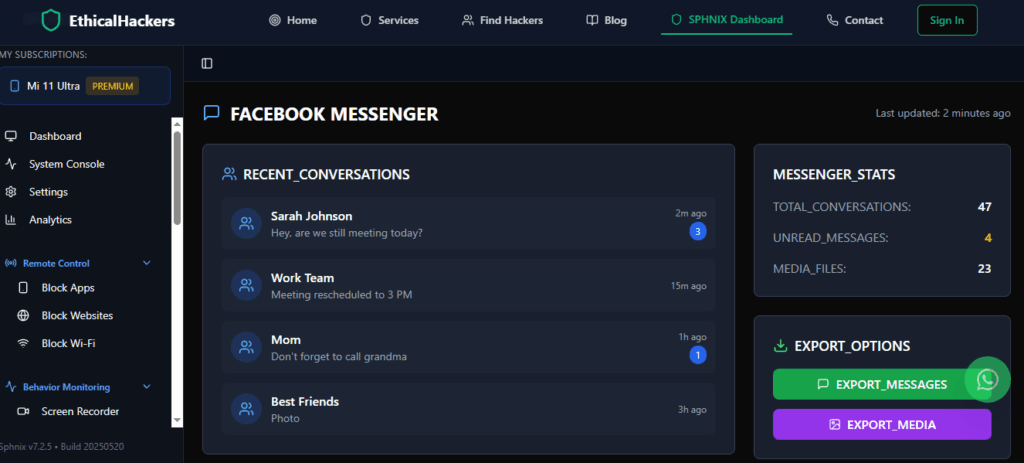
- Reported Capabilities: As a tracking app, Sphnix is marketed to offer a wide range of covert monitoring features, likely including call and message logging, GPS location tracking, and access to social media and photo galleries. Its primary focus appears to be on remaining undetected while gathering device data.
- Installation Reality: Like similar tools, Sphnix will almost certainly require direct, physical installation on the target device. Potential users should be prepared for a manual setup process that involves configuring the device to allow installation from unknown sources (on Android) and navigating significant security warnings. Thorough, independent research into its current compatibility and reliability is essential before consideration.
Parentaler: The Parent-Focused Safety App
As the name suggests, Parentaler is tailored for parents, with a philosophy that appears to center on child safety and digital wellbeing.

- Reported Capabilities: Parentaler’s features are likely designed around parental oversight, such as monitoring text messages and social media activity on platforms popular with younger users. It may include tools for setting screen time schedules, filtering web content, and receiving safety alerts based on specific keywords or contacts.
- Installation Reality: While still requiring installation on the child’s device, parental control apps like these can sometimes be installed more transparently as part of a family safety agreement. The process would involve downloading the app (possibly from an official app store) and configuring permissions, which may be less intrusive than full stealth surveillance apps.
A Professional’s Guide to the Installation Process
For legal Android installation, here is the general process you will follow, regardless of the specific app:
- Preparation: Purchase your subscription from the provider’s official website. You will receive login details for your web dashboard.
- Physical Access: Secure brief, uninterrupted access to the target Android device.
- Disable Security Protections: Go to
Settings > Securityand enable “Install unknown apps” or “Unknown sources” for the browser you will use. - Download & Install: Using the device’s browser, go to the unique download link provided in your control panel. Download and run the installer, clicking through multiple security warnings from the device.
- Grant Permissions: Once installed, open the app and grant it all requested permissions, which are extensive (Accessibility Services, Location, App Overlay, etc.). This step is critical for the app to function.
- Activate & Hide: Follow the in-app prompts to activate the service with your license key. Then, hide or delete the app icon as per the instructions. The app will begin syncing data to your remote dashboard.
For iOS, the process is more restrictive and may involve using iCloud or, for diminished returns and great security risk, jailbreaking.
Comparison and Best Practices for Responsible Use
The following table compares the core aspects of these applications to help you understand their different focuses:
Regardless of the tool, follow these best practices:
- Verify Legality Continuously: Your legal right to monitor must be ironclad.
- Secure Your Dashboard: Use a strong, unique password for your monitoring control panel.
- Weigh Transparency: Consider whether covert spying or open conversation about safety and monitoring is more appropriate for your situation, especially with children.
- Understand the Risks: On Android, disabling security features to install these apps can itself make the device vulnerable.
Conclusion: Capability, Complexity, and Conscience
The question of how to install spy software on cell phone remotely reveals a world of technical capability, significant complexity, and profound ethical weight. Tools like mSpy offer formidable power for those with a legal need, while apps like Parentaler provide a more safety-oriented path. The “remote” dream of effortless, touchless installation is largely a myth; reality involves careful planning, physical access, and navigating device security.
These technologies should not be used to invade privacy out of suspicion, but as protective measures within clear legal boundaries. If your situation involves complex digital concerns that fall outside standard monitoring—such as investigating sophisticated cyber threats or data breaches—it may be time to seek specialized expertise.
For professional guidance on complex digital investigation needs, consult with an expert.
Hire a Hacker
Frequently Asked Questions (FAQs)
Can I install monitoring software using just the target phone number?
No. This is a persistent myth and a common scam. Legitimate monitoring software requires either direct installation on the device (needing physical access) or, for limited iOS data, the iCloud username and password. There is no technical way to install full-featured monitoring software using only a phone number.
Will the person know the software is installed on their phone?
High-quality apps like mSpy are designed to operate in stealth mode, meaning they hide their icon and run discreetly in the background. However, a technically savvy user might notice increased battery drain, data usage, or unfamiliar processes in device settings. Furthermore, if the device restarts, some apps may require re-enabling permissions, which could create a visible prompt.
Is it better to use built-in parental controls instead?
For many parents, yes. Built-in tools like Apple’s Screen Time and Google Family Link offer robust management of screen time, app limits, content filtering, and location sharing directly from your own device. They are legal, transparent, and designed to foster healthy digital habits. Third-party spy apps offer deeper, covert surveillance but lack some of these holistic wellbeing features and carry greater legal and ethical risks.