
If you’ve ever wondered how to clone an iPhone remotely, you’re not alone. This phrase conjures images of creating a perfect, undetectable digital duplicate of someone’s device from miles away, capturing every message, photo, and login. As a cybersecurity professional with over a decade of experience in digital forensics and mobile security, I’m here to provide clarity.
The Hollywood version of remote cloning is pure fiction for modern iPhones. However, the legitimate need behind the search—whether for parental peace of mind, recovering a lost device, or authorized monitoring—is very real. This guide will demystify the technology, explain what Apple’s security actually allows, and show you the legal, practical methods to achieve oversight. We will explore the tools that work, the stark legal boundaries you must respect, and when it’s time to call a professional.
Understanding Apple’s Security Wall: Why True Remote Cloning Fails
To understand why remote cloning is so difficult, you must first appreciate Apple’s security architecture. iPhones are built with a multi-layered defense system designed to protect user data at all costs.
- The Secure Enclave: This is a dedicated, hardware-based security coprocessor physically isolated from the main chip. It handles encryption keys and biometric data (Touch ID, Face ID). These keys never leave the Secure Enclave, meaning even if data is extracted, it often remains an encrypted, unreadable mess without this specific physical component.
- End-to-End Encryption (E2EE): Services like iMessage, FaceTime, and Health data are encrypted on the sender’s device and only decrypted on the recipient’s device. Not even Apple can access this data in transit.
- Software Sandboxing: Each app operates in its own “sandbox,” prevented from accessing data from other apps or critical system files without explicit user permission.
These layers create a formidable barrier. There is no magical software that can bypass these protections from a remote location to create a functional clone. Any service claiming to offer this is almost certainly a scam.
The Legal and Ethical Imperative: Consent is Non-Negotiable
Before exploring any technical method, the legal framework is absolute. Unauthorized access to someone else’s device or data is illegal under laws such as the Computer Fraud and Abuse Act and similar legislation worldwide. It can result in severe criminal penalties and civil lawsuits.
Legal monitoring is confined to two primary scenarios:
- Parental Responsibility: Monitoring the devices of your minor children to ensure their online safety.
- Device Ownership with Explicit Consent: Monitoring a device you own (e.g., a company-issued phone) that you have provided to an employee or another individual with their prior knowledge and formal agreement.
Attempting to monitor an adult—such as a spouse, partner, or friend—without their consent is illegal, regardless of your suspicions. This guide focuses exclusively on methods applicable to the legal scenarios above.
Method 1: iCloud Syncing and Backup Analysis (The Authorized Approach)
The most effective way to access iPhone data remotely is through the user’s own iCloud account. This isn’t “cloning,” but it provides access to a vast amount of synced and backed-up data.
How It Works:
If you have the target Apple ID and password (which a parent may have for their child’s account), you can access their iCloud data in two ways:
- Via iCloud.com: Signing in gives you direct access to synced photos, notes, contacts, calendars, and sometimes recent text message backups (if enabled).
- Via iCloud Backup Extraction: More comprehensive data lives in the iPhone’s full backup stored on iCloud. Specialized forensic software can download this backup file to a computer and extract its contents—including message history, app data, and device settings—for review.
Crucial Limitations:
- Requires Credentials: You must have the correct login and may need to bypass two-factor authentication.
- Not Real-Time: Backup data is only as current as the last automatic or manual backup.
- Incomplete: With the introduction of Advanced Data Protection, more data categories are end-to-end encrypted, making them inaccessible even from an iCloud backup.
Method 2: Monitoring Applications and Their Capabilities
For ongoing, near-real-time oversight, dedicated monitoring applications are the standard solution. Critically, even these require one-time physical access to the target iPhone for installation. After setup, they relay data to a web-based dashboard you can view remotely.
App Analysis: Sphnix Tracking App
Sphnix is a monitoring tool designed for device tracking. Its features for iPhone are constrained by Apple’s iOS security but can provide valuable data points.
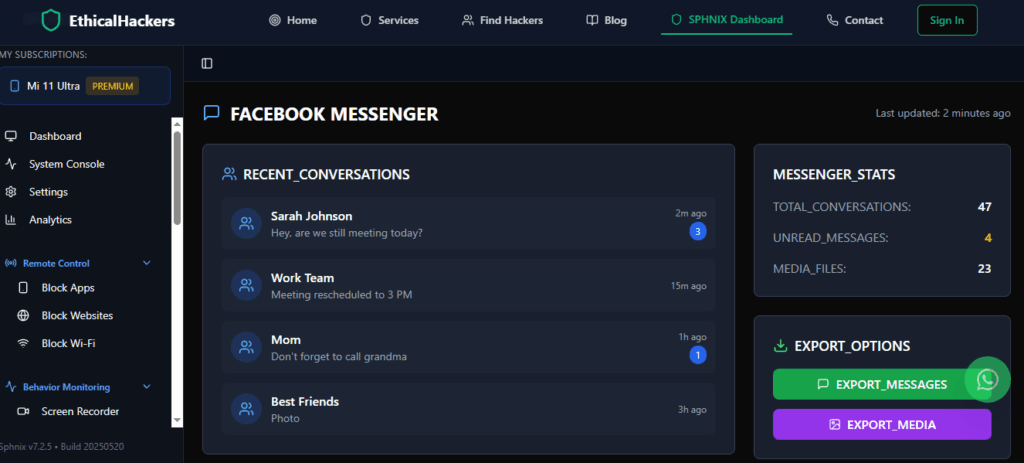
Key Features for iPhone:
- Location Tracking: Provides real-time GPS location and location history.
- Basic Call & Contact Monitoring: May access call logs and contact lists.
- Data Syncing: Can relay information from certain synced data sources.
Important Note: Due to iOS restrictions, its ability to monitor social media apps or iMessages directly is often limited without compromising the device’s security (jailbreaking), which is not recommended.
App Analysis: Scannero
Scannero operates on a different principle. It is primarily a phone number investigation tool, not a full device monitor.
Key Features & Function:
- Number Lookup: Identifies unknown callers and provides background information on phone numbers.
- Location Services: Can approximate a phone’s location based on number, but this is distinct from GPS tracking.
- Use Case: It is more useful for identifying who a person is in contact with or locating a lost device associated with a number, rather than accessing message content or creating a device clone.
App Analysis: Moniterro
Moniterro is marketed as a comprehensive monitoring solution. Its effectiveness on iPhone depends heavily on the specific iOS version and whether advanced setup steps are followed.

Expected Features:
- Social Media & Message Monitoring: Aims to track activity on platforms like WhatsApp, Snapchat, and SMS.
- Location Tracking: Typically includes GPS tracking features.
- Key Consideration: To achieve deeper functionality on modern iPhones, many apps like Moniterro may require installing a configuration profile and having the target iCloud credentials, moving it closer to the iCloud data access method than traditional “cloning.”
A Realistic Comparison of Your Options
| Method / Tool | How It Works | Best For | Key Limitation |
|---|---|---|---|
| iCloud Backup Analysis | Accesses & decrypts the iPhone’s backup file from Apple’s servers. | Historical data review; digital forensics. | Not real-time; requires credentials & backup to be on. |
| Sphnix / Moniterro | Installed app or profile that relays device data to a dashboard. | Near real-time monitoring (post-installation). | Requires initial physical access; iOS limits depth of data. |
| Scannero | Investigates phone numbers and provides associated data. | Identifying unknown contacts or locating a number. | Does not clone a device or show personal message content. |
| Professional Forensic Service | Uses advanced, legal methods and tools for data extraction. | Legal investigations, data recovery, complex cases. | Requires device or backup access; is a professional service. |
The Physical Access Requirement: Why “Remote” Installation is a Mirage
A core promise of “remote cloning” is installation without touching the device. For iPhones, this is technically implausible. Apple’s App Store review process and app sandboxing prevent the installation of hidden monitoring apps from a remote location. Any service claiming to clone an iPhone remotely with just a phone number is deceiving you. The only potential exception involves sophisticated (and expensive) government-grade exploits, which are not available to the public. For all practical, legal purposes, you must have the iPhone in hand to begin any form of monitoring setup.
When to Seek Professional Digital Investigation Services
For situations that extend beyond parental control—such as a corporate investigation, gathering evidence for legal proceedings, or recovering data from a lost or damaged device—professional services are the appropriate channel.
A reputable firm like SpyWizards employs certified experts in digital forensics. They do not engage in illegal hacking or “cloning.” Instead, they use legally sanctioned methods, often requiring you to be the owner of the device or to have a court order. They can perform advanced data recovery from damaged devices, analyze complex digital evidence, and provide documentation that can hold up in legal settings. This is the legitimate alternative to searching for questionable “clone” software.
Conclusion: Shifting from Myth to Managed Oversight
The fantasy of remotely cloning an iPhone with a click is just that—a fantasy. Apple’s security has made it so. However, by shifting your goal from “cloning” to “authorized monitoring,” you open the door to practical, legal solutions. For parents, a combination of iCloud oversight and carefully chosen monitoring software like Sphnix or Moniterro, installed with physical access, provides powerful tools for protection. For investigative or recovery needs, professional forensic services are the only ethical and effective path. By understanding the technology’s limits and respecting the law, you can achieve your legitimate goals without compromising your ethics or risking severe legal consequences.
Frequently Asked Questions (FAQs)
Q1: Is there any app that can clone an iPhone with just the phone number?
No, this is impossible. A phone number is not a backdoor into a device’s operating system. Such claims are hallmarks of scams designed to steal your money or personal information. Modern phone security, especially Apple’s, cannot be bypassed this way.
Q2: If I use my child’s Apple ID on an old iPhone, will it clone their phone?
Signing into their Apple ID on another device will sync certain data (like photos, contacts, notes if enabled) to that second device. However, it will not create a functional clone. The device will not mirror live activity, receive their separate iMessages, or duplicate installed apps. It is a data sync, not a device clone.
Q3: What is the most reliable method for a parent to monitor their child’s iPhone?
The most reliable method is a two-part approach: 1) Have an open conversation about online safety and establish that you will be monitoring their device for their protection. 2) Use the child’s Apple ID credentials (which you should have as a parent) to periodically review their iCloud backup data or use a parental control app that requires one-time installation on their device, accepting its limitations within iOS. Transparency and legal authority are the foundations of reliable monitoring.