
Have you ever needed to see someone else’s iMessages? Perhaps you’re a parent worried about who your teenager is texting, a business owner ensuring company phones are used properly, or someone with legitimate concerns about a partner’s digital activity. As someone who has worked in digital security and communications for over ten years, I’ve seen firsthand how Apple’s famous encryption creates both privacy and frustration.

iMessages are designed to be secure, making the idea of accessing them on another device seem impossible. If you’ve searched for how to get someone else’s iMessages on your phone, you’ve likely found confusing or illegal advice. This guide changes that. I will explain the real, working methods that respect both the law and Apple’s security, focusing on transparent monitoring for parents and businesses rather than secret spying.
Understanding Why iMessages Are So Secure
Before discussing solutions, you must understand the challenge. Apple’s iMessage system uses end-to-end encryption (E2EE). This means messages are scrambled on the sender’s device and only unscrambled on the receiver’s device. Not even Apple’s servers can read them in transit.
For you, this creates a fundamental technical barrier:
- No Direct Interception: You cannot simply “tap into” the network and capture messages.
- Apple ID Locked: Messages are tied to the user’s Apple ID and specific devices approved by them.
- Sync Limitations: iMessages only sync automatically to devices logged into the same Apple ID.
This security is why many online “hacks” are scams. The only reliable ways to monitor iMessages work with this system, not against it, by accessing the data where it is decrypted and stored: on the target device itself or in its official backups.
The Critical Legal and Ethical Framework
Attempting to access someone’s private messages without their knowledge is illegal in most places, violating laws like the Computer Fraud and Abuse Act. It can result in criminal charges and civil lawsuits.
Legal monitoring rests on two pillars:
- Ownership or Parental Rights: You own the device (e.g., a company phone given to an employee) or you are the parent/guardian of a minor child using the device.
- Consent: The user has been notified that the device is monitored (standard for corporate devices) or, in the case of minors, parental authority provides the legal right to oversee their safety.
The methods discussed here are for these legal scenarios: parental control and authorized business device management. Using them to spy on a spouse, friend, or adult without consent is a serious crime.
Method 1: iCloud Sync & Backup Extraction
This is the most common technical method that actually works, leveraging Apple’s own ecosystem.
How It Works:
If the target iPhone has iCloud Backup enabled for Messages, a copy of all iMessages is stored on Apple’s servers. If you have the correct Apple ID and password credentials (which a parent may have for their child’s account), you can access this backup.
The Process:
- Obtain the iCloud credentials for the target account.
- Use a dedicated data extraction tool (commercial software exists for this purpose) to download and decrypt the iCloud backup to a computer.
- The software parses the backup, allowing you to read the extracted iMessage history, attachments, and sender information.
Limitations:
- Not Real-Time: You only get messages from the last backup, not a live stream.
- Requires Credentials: You must have the Apple ID password and, if enabled, the two-factor authentication code.
- Can Be Inconsistent: If iCloud Messages is turned off, no messages are backed up.
Method 2: Targeted Monitoring Software
For real-time access, specialized monitoring apps installed directly on the target iPhone are the most effective solution. These apps are designed for parental control and require one-time physical access to the device for installation.
How They Work:
Once installed, they operate discreetly in the background. They do not break Apple’s encryption but capture iMessage data as it is displayed on the device—after it has been decrypted for the user to read. This data is then securely sent to a private online dashboard that you can access from your own phone or computer, effectively showing you how to get someone else’s iMessages on your phone through a monitoring portal.
App Analysis: Sphnix Tracking App
Sphnix is a monitoring suite that includes iMessage tracking among its features. It focuses on capturing communications and device activity for authorized oversight.
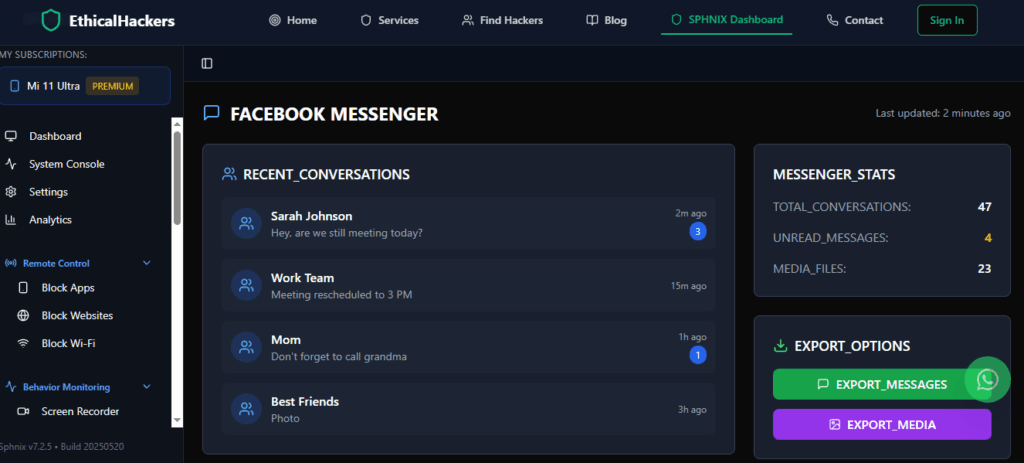
Key Features for iMessages:
- Message Logging: Records incoming and outgoing iMessage text.
- Contact Tracking: Logs the phone numbers or Apple IDs involved in conversations.
- Media Access: Captures photos, videos, and files shared via iMessage.
- Stealth Operation: Runs invisibly on the target device after setup.
App Analysis: Scannero
Scannero takes a different approach, often marketed as a location and number lookup service. Its connection to iMessages may involve identifying unknown numbers that appear in a message thread or providing contextual data about contacts.
Key Features (Contextual):
- Number Identification: Can reveal details about phone numbers that send iMessages.
- Location Services: May provide background on a contact’s location history.
- Data Aggregation: Compiles public data on phone numbers and associated individuals.
Important Note: Scannero is less likely to show direct message content. It is more useful for investigating who a person is communicating with rather than seeing the conversation content itself.
App Analysis: Moniterro
Moniterro is positioned as a comprehensive parental control application. It is likely designed to offer direct monitoring of device activities, including messaging apps.

Expected Features for iMessages:
- Direct Message Monitoring: Potential access to iMessage content, similar to other parental control suites.
- Social Media Coverage: Often extends to other apps like Snapchat, Instagram, or WhatsApp.
- Device Management: May include screen time controls, app blocking, and location tracking.
For definitive features, visiting their official site is recommended to confirm current iMessage capabilities.
Comparing Your Primary Options
| Method | How It Works | Best For | Key Limitation |
|---|---|---|---|
| iCloud Backup Extraction | Downloads & decrypts the iPhone’s iCloud backup file. | Historical review; when you have Apple ID credentials. | Not real-time; requires backups to be enabled. |
| Sphnix / Moniterro | Installs an app on the iPhone to capture data post-decryption. | Real-time, comprehensive parental or employee monitoring. | Requires physical access to the target iPhone. |
| Scannero | Identifies and researches phone numbers & contacts. | Investigating unknown contacts, not reading message content. | Does not typically show actual iMessage texts. |
A Step-by-Step Guide to Authorized Implementation
If you have a legal right to proceed, follow these steps:
- Choose Your Method: Decide between historical data (iCloud Backup) or real-time monitoring (Sphnix/Moniterro).
- Secure Necessary Access: For software, plan for one-time physical access to the iPhone. For iCloud, ensure you have valid login credentials.
- Disable Find My iPhone: For most software installation, this must be temporarily turned off in the device settings.
- Install & Configure: Follow the app’s setup wizard precisely. For iCloud extraction, use reputable software on your computer.
- Access Your Dashboard: Log into the monitoring control panel from your own phone or computer to view the iMessage data.
- Maintain Discretion: Use the information responsibly for safety and protection, not for unnecessary intrusion.
When Professional Assistance is the Right Choice
Sometimes, the situation is too complex, legally sensitive, or technically difficult for a DIY approach. If you are dealing with a serious issue like corporate espionage, a high-stakes divorce requiring digital evidence, or need to recover messages from a damaged phone, a professional service is warranted.
This is where a firm like SpyWizards operates. They provide certified experts who use advanced, legal forensic techniques. They can navigate complex data recovery, provide court-admissible evidence, and conduct investigations that go far beyond consumer apps. For legitimate, high-stakes needs, this is the secure and professional path.
Conclusion: Knowledge, Responsibility, and the Right Tool
Gaining insight into someone else’s iMessages is a significant undertaking, bounded by strong encryption and stronger laws. The workable methods—iCloud backup analysis and authorized monitoring software like Sphnix or Moniterro—require specific access and a clear legal right. Tools like Scannero serve a different, more investigative purpose. Success depends on matching your legitimate goal with the correct technical solution and proceeding with a respect for both ethics and the law. For situations where the stakes are high and the path is unclear, turning to professional ethical hackers can provide the expertise needed to navigate these challenging waters legally and effectively.
Frequently Asked Questions (FAQs)
Q1: Can I just forward someone’s iMessages to my phone?
No, not remotely. iMessages are end-to-end encrypted and locked to the recipient’s Apple ID and device. There is no setting to secretly forward them to another Apple ID. The only way to see them on your phone is through a monitoring app’s dashboard or by extracting them from a backup and viewing them on your computer.
Q2: Will the person get a notification if I use these methods?
With monitoring software installed directly on the device, no notification is sent. The apps are designed to run in stealth mode. However, if you access their iCloud account from a new device or browser, they may receive a security alert from Apple if they have two-factor authentication enabled, depending on the specific action.
Q3: What’s the difference between monitoring software and “spyware”?
The difference is consent and intent. “Spyware” is malicious software installed secretly to steal data for harmful purposes (fraud, blackmail). Monitoring software discussed here is for legal parental control or business device management, often requiring physical possession of a device you own. The technology can be similar, but the legal context and authorization define its use.