
If you’ve searched for how to clone a cell phone to check text messages, you’re likely driven by worry or suspicion. As a digital security specialist with a decade of experience, I can tell you that true “cloning” in the spy-movie sense is largely a myth for modern smartphones.

However, the legitimate concern behind your search—whether it’s protecting a child or recovering a compromised account—is very real. This guide will cut through the misinformation. I will explain what is technically possible, navigate the strict legal boundaries, and show you the ethical, effective tools that provide oversight without crossing into illegal surveillance.
Understanding the Legal Framework: Consent is Everything
Before we examine a single method, you must understand the legal foundation. In virtually all jurisdictions, accessing someone else’s private communications without their explicit consent is a crime. Laws such as the Computer Fraud and Abuse Act carry serious penalties.
Legitimate monitoring rests on two clear pillars:
- Parental Responsibility: You have the right to monitor the device activity of your minor child to safeguard them from online dangers.
- Ownership with Consent: You are monitoring a device you own (like a company phone) issued to an employee or another individual with their prior knowledge and formal agreement.
Notably, simply being on the same family phone plan or using Apple’s Family Sharing does not grant you access to another member’s text messages. Any method discussed here assumes you are operating within these legal and ethical boundaries.
Phone Cloning vs. Monitoring: A Critical Distinction
The idea of creating a perfect, undetectable duplicate of a phone is a misconception. Modern security makes true real-time cloning impractical. Instead, what people often seek is achieved through monitoring or data syncing, which provides access to specific types of data, like messages.
The table below clarifies the key differences and legal status of common approaches:
Method 1: Using Built-in Features for Your Own Devices
For those looking to access their own text messages across devices, the simplest solutions are built into the operating systems.
- For Android: Google Messages for Web. This official feature lets you pair your phone’s Messages app with a web browser. By scanning a QR code, you can read, send, and manage your SMS texts from any computer.
- For iPhone: Text Message Forwarding. Within Apple’s ecosystem, you can set up your iPhone to forward SMS and iMessages to your iPad, Mac, or other Apple devices logged into the same Apple ID. This keeps your own conversations seamlessly synced.
These methods are perfect for convenience but are designed for managing your own account, not for monitoring someone else.
Method 2: Parental Control and Monitoring Applications
For parents, dedicated monitoring software is the most reliable and comprehensive legal solution. These apps are installed on your child’s device and report data to a secure online dashboard you control.
mSpy: Extensive Surveillance Capabilities
mSpy is a powerful tool known for its depth of tracking. Independent testing confirms it can monitor text messages (SMS), social media chats, emails, and track real-time location. It operates discreetly and can capture keystrokes, giving insight into what is typed, even in messages that are later deleted.

Important Considerations: mSpy works more reliably on Android and can face limitations on iPhones due to Apple’s stricter security. It is also priced higher than many competitors, with plans ranging from approximately $11.56 to $69.99 per month. It is designed for monitoring and lacks some nurturing parental features like detailed screen time management.
Parentaler: Focused on Child Safety
Parentaler is explicitly marketed as a parental control solution. It allows you to monitor your child’s text messages and social media conversations to help protect them from cyberbullying and inappropriate contact. Its features typically include location tracking, web content filtering, and screen time management tools designed to foster healthy digital habits, not just surveil.
It represents a category of apps focused on safety and oversight with a slightly more balanced approach between monitoring and positive habit building.
Sphnix Tracking App
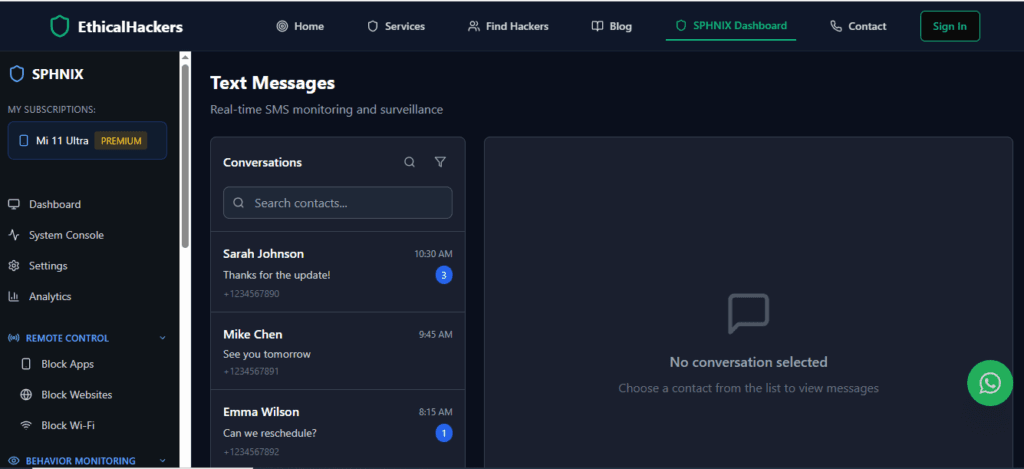
Sphnix is another app in the monitoring space. While specific details on its full feature set are best obtained from the provider, tools in this category generally offer a suite of functions including call and message monitoring, GPS location tracking, and access to social media activity. As with all such apps, its legal use is confined to monitoring devices you own or for which you have explicit consent.
Method 3: iCloud Backup Extraction (For Insight, Not Live Monitoring)
If you have the legal right and the necessary iCloud credentials (such as those of your minor child), accessing an iPhone’s backup can provide historical data. This isn’t live monitoring but a snapshot of what was on the device at the time of the last backup.
Forensic experts use this method to recover messages, photos, and app data. For parents, it can be a way to review past activity. However, it has major drawbacks: it’s not real-time, requires backups to be enabled, and if the user has Apple’s Advanced Data Protection enabled, decryption becomes significantly more difficult.
Why Professional Ethical Hacking is the Right Choice for Complex Situations
You may face a situation beyond the scope of parental controls, such as recovering a hacked account, investigating a serious business threat, or needing forensic evidence for legal proceedings. In these complex, high-stakes scenarios, DIY methods are insufficient and risky.
This is where a professional service like SpyWizards becomes relevant. They operate within a strict ethical and legal framework, conducting authorized security audits, forensic data recovery, and incident response only with the explicit permission of the device owner. They do not engage in illegal “cloning” or unauthorized access but use advanced techniques to recover and secure data legally.
For legitimate, complex digital security challenges, this is the correct and professional path.
Conclusion: Choosing the Ethical Path Forward
The question of how to clone a cell phone to check text messages finds its only responsible answer in authorized monitoring and transparency. For parents, tools like mSpy (for extensive surveillance) and Parentaler (for safety-focused oversight) provide legal, powerful means to protect children. It is crucial to remember that these are tools for safety and responsibility, not for secret surveillance of other adults.
If your needs involve investigation, recovery, or legal evidence, bypass consumer software altogether and consult with professional ethical hackers who can operate within the law to achieve your legitimate goals. By choosing the right tool for the right reason, you protect not only the information you seek but also your own legal and moral integrity.
Frequently Asked Questions (FAQs)
Q1: Can the person tell I’m monitoring their phone with these apps?
High-quality monitoring apps are designed to run in stealth mode, hiding their icon and operating silently. However, increased battery usage or data consumption could theoretically raise suspicion. Transparency with children about general monitoring for their safety is always the best policy.
Q2: Is it legal to use these apps if I suspect my spouse is cheating?
No. Using monitoring software on another adult’s device without their explicit consent is almost always illegal, regardless of your relationship or suspicions. It constitutes an invasion of privacy and computer fraud. Legal recourse for suspicion does not include unauthorized surveillance.
Q3: What’s the difference between a parental control app and spyware?
The difference is consent, intent, and legality. Parental control apps are used legally by parents to protect minors on devices they own. “Spyware” refers to malicious software installed secretly to steal data for harmful purposes like fraud or blackmail. The technology can be similar, but the legal context and authorization define its use.