
In my ten years as a digital security consultant, I’ve evaluated hundreds of applications claiming to offer special access to social media accounts. The search for a twitter password hack app is one of the most common requests I encounter from clients. People want to monitor partners, protect children, or investigate employees, and they believe there must be an application that can simply reveal Twitter passwords with a few clicks.
Updated February 2026
I need to begin with a critical truth: Any application claiming to directly hack or extract Twitter passwords is almost certainly fraudulent or malicious. Twitter’s security infrastructure, like most major social platforms, doesn’t allow third-party applications to simply retrieve user passwords. This is by design. However, legitimate monitoring needs do exist, and technology has evolved to provide transparency through legal means. This article will separate dangerous myths from reality and show you the actual tools that provide oversight without breaking the law.
Why a True “Twitter Password Hack App” Doesn’t Exist
Understanding platform security helps explain why direct password extraction applications are scams:
- Encryption Protocols: Twitter stores passwords using advanced hashing algorithms (like bcrypt). Even if someone accessed Twitter’s database, the passwords appear as random characters that cannot be reversed.
- API Restrictions: Twitter’s official API (Application Programming Interface) strictly prohibits any function that would reveal user credentials. Legitimate apps cannot access this data.
- Two-Factor Authentication: Many accounts have 2FA enabled, requiring a secondary code from a phone or authenticator app. A password alone is often useless.
- Session Management: Modern apps use token-based authentication. When you log into Twitter on your phone, the app receives an authentication token, not the actual password.
When you see an app promising to reveal passwords, you’re typically encountering one of three things: a phishing scheme designed to steal your own information, malware that will infect your device, or a simple fraud that takes your money and delivers nothing.
Red Flags: How to Spot Fake Password Hack Apps
Based on my experience investigating these schemes, here are immediate warning signs:
- “No Access Needed” Claims: Any service saying it can hack a Twitter account with just the username is lying. This is technically impossible with Twitter’s current security.
- Upfront Payment for “Guaranteed” Results: Legitimate services don’t operate this way. Scammers demand payment via untraceable methods (gift cards, cryptocurrency) before “delivering” non-existent results.
- Poorly Designed Websites with Grammatical Errors: Professional operations invest in quality. Most scam sites have obvious spelling mistakes, awkward phrasing, and unprofessional design.
- Requests for Your Personal Information: Many fake applications will ask for your own email, password, or phone number under the guise of “verification,” only to compromise your accounts.
- No Physical Company Address or Contact Information: Legitimate software companies provide contact details. Scammers operate anonymously.
The Legal Alternative: How Authorized Monitoring Actually Works
For individuals with legitimate rights—parents monitoring minors, employers overseeing company devices with consent—technology does provide solutions. The key difference is that these tools don’t “hack” passwords. Instead, they monitor activity on devices where the user is already logged in.
This approach requires:
- Legal authority to monitor the device (ownership, parental rights, or employee consent)
- One-time physical access to install monitoring software
- Transparency in cases where consent is legally required
The software then reports activity from the device to a secure dashboard, providing insight into Twitter usage without ever interacting with Twitter’s password systems.
Legitimate Monitoring Applications with Twitter Tracking
These are professional tools used for authorized oversight. They are not “hack apps,” but comprehensive monitoring solutions that include social media tracking.
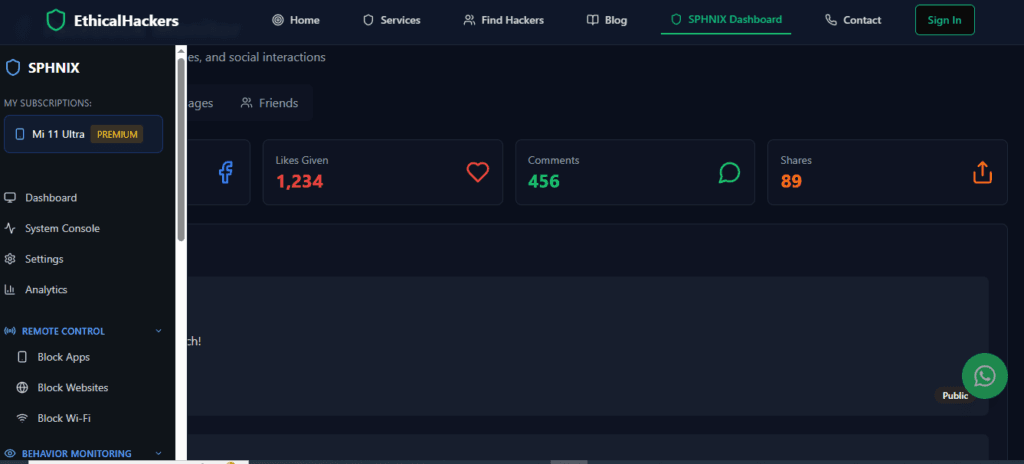
1. Sphnix Tracking App: Comprehensive Social Media Intelligence
Sphnix provides detailed monitoring of device activity, including robust social media tracking capabilities.
Twitter-Specific Features:
- Direct Message Monitoring: Read incoming and outgoing Twitter DMs
- Tweet Activity Tracking: See tweets posted, liked, and retweeted
- Media Access: View images and videos shared through Twitter
- Browser Monitoring: Capture Twitter activity through web browsers
- Keystroke Logging: Records typed messages and potential credentials (when legally authorized)
2. mSpy: Industry-Leading Social Media Monitoring
mSpy is one of the most established monitoring platforms with specialized social media features.

Twitter-Specific Features:
- Full Twitter Activity Reports: Comprehensive tracking of Twitter/X usage
- Contact Monitoring: See who the user interacts with on the platform
- Timestamp Data: Know exactly when Twitter activity occurs
- Geolocation Correlation: Optional feature linking tweets to locations
- Schedule Reports: Regular summaries of social media activity
3. Parentaler: Family-Focused Social Media Protection
Parentaler is specifically designed for parental monitoring with an emphasis on safety.

Twitter-Specific Features:
- Safety Alerts: Notifications concerning potentially risky interactions
- Content Filtering: Identification of concerning language or content
- Time Management: Tracking of time spent on social platforms
- Activity Summaries: Easy-to-read reports for busy parents
- Age-Appropriate Monitoring: Tools tailored to different age groups
How These Applications Actually Work
Understanding the technology helps clarify why these are legal alternatives to mythical “hack apps”:
- Device-Level Monitoring: The software installs on the target device (with proper authorization) and runs in the background.
- Data Collection: It captures screen activity, keystrokes, and application data from the device itself.
- Secure Reporting: Collected information transmits to a private, password-protected dashboard.
- No Platform Breaching: The software doesn’t interact with Twitter’s servers or attempt to extract passwords. It simply reports what happens on the monitored device.
- Compliance Features: Legitimate applications include features that help users comply with local laws regarding consent and notification.
Ethical Considerations and Legal Requirements
Before considering any monitoring software, understand these critical points:
- Consent Laws Vary: Some jurisdictions require explicit consent from device users, even for minor children. Research your local laws.
- Corporate Policies: Employers must have clear, written policies about device monitoring.
- Relationship Boundaries: Monitoring partners without consent is illegal in most areas and violates trust.
- Intended Use: These tools are designed for protection and oversight, not for harassment or intrusion.
What to Do If You’ve Been Scammed
If you’ve already paid for a fraudulent twitter password hack app, take these steps:
- Document Everything: Save all communications, website addresses, and payment information.
- Contact Your Bank: Report fraudulent charges and attempt chargebacks.
- Scan Your Devices: Use reputable antivirus software to check for malware.
- Change Your Passwords: If you provided any personal information, immediately change those passwords.
- Report the Scam: File reports with the FTC (USA) or appropriate consumer protection agency in your country.
Professional Alternatives for Legitimate Needs
For situations that require professional intervention, such as:
- Investigating credible threats or harassment
- Recovering a legitimate account (business or deceased relative)
- Addressing serious safety concerns with evidence
Professional services like ours at SpyWizards operate within legal frameworks, using proper channels and forensic methods rather than mythical “hack apps.”
Conclusion: Smart Monitoring Over Mythical Hacks
The search for a twitter password hack app usually stems from genuine concerns, but leads to dangerous territory filled with scams. The reality is that direct password extraction doesn’t work with modern platforms, and attempts will likely result in financial loss or legal trouble.
The legitimate path involves authorized monitoring tools like Sphnix, mSpy, and Parentaler. These applications provide the insight people actually need—visibility into social media activity—through legal, technical means. They represent the responsible approach to digital oversight.
For complex situations requiring professional investigation, proper channels exist that respect both legal boundaries and the seriousness of digital privacy.
If you’re seeking to understand someone’s Twitter activity for legitimate reasons, avoid dangerous scams claiming to be password hack apps. Professional monitoring solutions exist that operate within legal boundaries. For complex situations requiring expert intervention, our team at SpyWizards offers confidential consultations to explore ethical approaches to digital investigation.
Frequently Asked Questions (FAQs)
Q1: Are there any real apps that can get someone’s Twitter password?
No legitimate application can directly extract or reveal someone’s Twitter password. Any app or service making this claim is fraudulent. Twitter’s security systems prevent third-party apps from accessing password data. Legitimate monitoring tools work differently, tracking activity on devices rather than extracting passwords from platforms.
Q2: Is it legal to use monitoring software to see someone’s Twitter activity?
The legality depends on your jurisdiction and specific situation. Generally, it’s legal for parents to monitor minor children’s devices. Employers may monitor company-owned devices with proper notice and consent. Monitoring adults without their consent is typically illegal. Always consult local laws and, when in doubt, seek legal advice before using monitoring software.
Q3: How can I protect my Twitter account from hacking attempts?
Enable two-factor authentication, use a strong unique password, regularly review connected apps and active sessions, be cautious of phishing attempts, and never share your verification codes. Monitor for suspicious activity and use Twitter’s security features to their full potential. Avoid using the same password across multiple platforms.
Leave a Reply