
For over a decade, I’ve worked in digital security and forensic investigations. In that time, I’ve reviewed countless pieces of software, and one of the most frequent and dangerous searches I encounter is for a so-called gmail hacker app. Let me state this clearly: any application or website claiming to be a magical, one-click tool to illegally break into someone’s Gmail account is a scam. At best, it’s worthless; at worst, it’s malware designed to steal your money and data.
Updated February 2026
However, the underlying need that drives this search is often legitimate. Parents worry about their children’s email correspondence. Businesses need to oversee communications on company-owned accounts. Individuals may need to recover access to their own data. The good news is that legitimate, powerful tools exist for authorized monitoring. This guide will dismantle the myths, explain the legal landscape, and introduce you to professional-grade applications that provide transparency and oversight where you have a right to it. We will move from the fantasy of a malicious gmail hacker app to the reality of ethical monitoring solutions.
The Harsh Reality of “Gmail Hacker” Scams
When you search for a gmail hacker app, you enter a digital minefield. The offers you’ll find typically follow a predictable and dangerous pattern:
- The Fake Online “Hacker”: Websites promising instant access after you enter a target email address. These always fail, then demand payment for a “premium” service that never materializes. They exist solely to harvest credit card details.
- The Malicious Download: Apps, often found on unofficial forums or shady websites, that require installation. These are frequently trojans or spyware that will infect your device, stealing your own passwords, banking information, and personal data.
- The Credential Phisher: Disguised apps or sites that mimic Google’s login page. Their sole function is to trick you into entering your own Gmail credentials, which are then stolen.
Google’s security infrastructure, including multi-factor authentication (MFA), advanced threat detection, and end-to-end encryption for certain functions, makes direct, remote hacking via a simple app technically implausible. Believing otherwise makes you the perfect target for fraud. Understanding this is your first critical line of defense.
The Legal Framework for Email Access and Monitoring
Before considering any tool, you must establish your legal standing. Unauthorized access to an email account is a federal crime in the United States under laws like the Computer Fraud and Abuse Act and is similarly illegal worldwide.
Legitimate use cases are specific and narrow:
- Parental Control: Monitoring the email activity of your minor child.
- Corporate Policy: Overseeing company-owned email accounts, as explicitly outlined in an employee agreement.
- Personal Account Recovery: Regaining access to your own account through official Google recovery channels.
Accessing the email of a spouse, partner, or adult without their explicit consent is illegal, regardless of your relationship. Any ethical approach begins with this fundamental principle.
Legitimate Monitoring Suites with Gmail Capabilities
True professional monitoring does not come from a singular “Gmail hacker” tool, but from comprehensive suites that include email tracking as one feature among many. These applications are installed on a target device with authorization and provide remote access to a dashboard of activity.
1. mSpy
mSpy is an industry leader in monitoring software, known for its reliability and extensive feature set across messaging, social media, and yes, email.

Key Features:
- Email Monitoring: Tracks all emails sent and received through the Gmail app on the target device, showing content, timestamps, and attachments.
- Social Media & SMS: Monitors WhatsApp, Snapchat, Instagram, Facebook Messenger, and standard text messages.
- Keylogger: Records every keystroke, providing insight into searches, messages, and login attempts.
- GPS Location Tracking: Provides real-time and historical location data.
- Stealth Operation: Runs invisibly on the target device after installation.
Best For: Users who need an all-in-one solution for comprehensive digital oversight, including detailed Gmail monitoring.
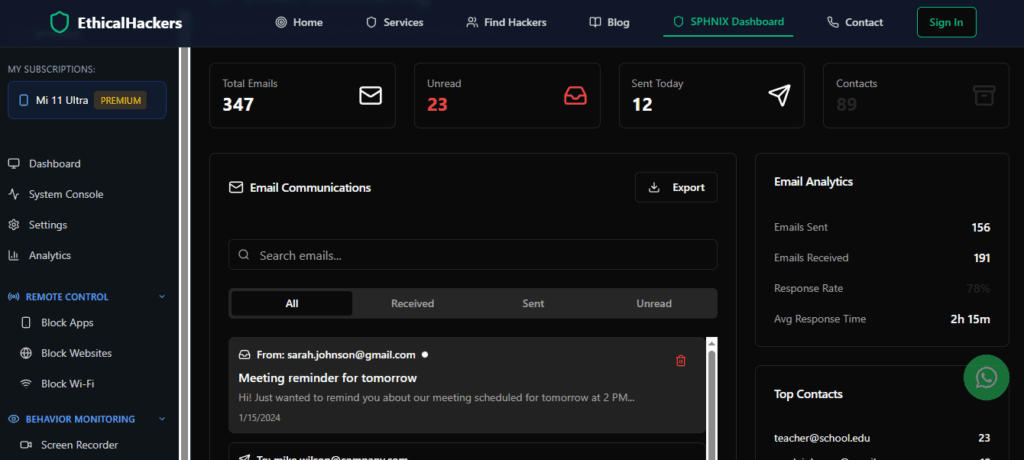
2. Sphnix Tracking App
Sphnix positions itself as a powerful and stealthy monitoring solution, offering deep device access for those with legitimate authority.
Key Features:
- Comprehensive Email Access: Logs incoming and outgoing Gmail messages with full content and header details.
- Ambient Listening: Remotely activate the device’s microphone to hear surroundings.
- Call Recording & Monitoring: Accesses call logs and can record live calls.
- Media File Access: Views photos, videos, and documents stored on the device.
- Remote Control Functions: Options to lock the device or wipe data if necessary.
Best For: Situations requiring deep surveillance capabilities and remote environmental monitoring alongside email access.
3. Parentaler
As the name implies, Parentaler is designed with a focus on parental controls, offering tools to guide and protect rather than just surveil.

Key Features:
- Email Oversight: Monitors email correspondents and can filter content or block specific senders.
- Screen Time Management: Sets strict schedules for when the device can be used.
- App Blocker: Restricts access to specific applications, including email if needed.
- Web Filter: Blocks inappropriate websites.
- Panic Button: Allows the child to send an immediate alert to the parent.
Best For: Parents who want to manage and guide their child’s digital life, using email monitoring as one component of a broader safety strategy.
How to Properly and Ethically Implement Monitoring
If you have a legal right to proceed, follow this responsible framework:
- Verify Your Authority: Confirm your situation falls under parental responsibility or company ownership with a clear policy.
- Select the Appropriate Tool: Choose based on your primary need—comprehensive surveillance (mSpy, Sphnix) or guided parental management (Parentaler).
- Secure Physical Access: For installation on Android devices, you will need brief, one-time physical access. For company-managed iOS devices, professional deployment may be possible via MDM (Mobile Device Management) solutions.
- Configure and Monitor: Complete the setup, hide the application as instructed, and begin monitoring via the secure web dashboard. The target device will transmit data whenever it has an internet connection.
Essential Security: Protecting Your Own Gmail Account
Understanding the threats is the best way to build defense. To ensure your account is never compromised by malicious software or phishing:
- Enable Strong 2-Factor Authentication: Use an authenticator app (like Google Authenticator or Authy) or a security key, not just SMS codes.
- Use a Unique, Complex Password: Employ a password manager to create and store a password used only for Gmail.
- Conduct Regular Security Checkups: Use Google’s built-in Security Checkup tool to review account activity, connected devices, and app permissions.
- Be Hyper-Vigilant About Phishing: Never click “login” links in emails. Always navigate to Gmail directly. Check sender email addresses carefully.
- Keep Software Updated: Ensure your device’s OS and browser are always patched with the latest security updates.
Engaging Professional Digital Investigators
There are circumstances where standard monitoring software is not enough. If you are dealing with complex legal matters, sophisticated corporate espionage, or need forensic evidence for court, professional expertise is required.
Certified ethical hackers and digital forensics experts can conduct authorized investigations, identify security breaches, trace digital activity, and provide legally admissible reports. They operate within strict legal boundaries to achieve clear objectives.
<a href=”https://spywizards.com” target=”_blank” style=”display: block; text-align: center; padding: 18px; background-color: #E74C3C; color: white; text-decoration: none; border-radius: 8px; font-weight: bold; margin: 30px auto; font-size: 1.1em; max-width: 350px;”>Hire a Professional Hacker for Investigation</a>
Conclusion: Choosing Reality Over Risky Fantasy
The search for a mythical gmail hacker app leads only to risk and loss. The path to legitimate oversight, however, is built on legal authority and professional tools. Applications like mSpy, Sphnix, and Parentaler provide powerful, ethical means to monitor email and digital activity where you have a rightful need.
Protect yourself by abandoning the search for illegal shortcuts. Instead, invest in understanding security, use legitimate software for its intended and authorized purpose, and for highly sensitive matters, rely on professional investigators. Your safety, your ethics, and your legal standing depend on making the informed choice.
Frequently Asked Questions (FAQs)
Q: Is there a free Gmail hacker app that actually works?
A: No. Any application or website claiming to offer free, unauthorized access to Gmail accounts is a scam. It will either steal your information, infect your device with malware, or trick you into paying for non-existent services. Legitimate monitoring software requires a subscription to support its development and infrastructure.
Q: Can these monitoring apps access Gmail without installing anything on the target phone?
A: Generally, no. For full email content monitoring, installation of an app on the target Android device is required. For iPhones with known iCloud credentials, some tools can sync data from an iCloud backup, which may include email, but this is less reliable than direct app monitoring.
Q: How can I tell if my Gmail has been hacked or monitored?
A: Check your Google Account’s security page immediately. Review “Your devices” for unfamiliar logins, check “Third-party apps with account access” for unknown applications, and examine “Forwarding and POP/IMAP” settings for unauthorized mail forwarding. Enable 2FA and change your password to a new, strong one immediately if you see anything suspicious.
Leave a Reply